
Most marketers are already using interstitial popups. The problem is that they don’t use them properly. I keep seeing the same generic popup pushed to every visitor seconds after they land on a page. That approach does not build leads.
It teaches people to ignore your message before they even engage with your content. The real power of interstitial popups comes from timing, relevance, and intent. A visitor exploring your pricing page needs a very different offer than someone who abandons their cart or leaves a blog post halfway through.
According to HubSpot’s 2026 State of Marketing Report, 61% of marketers believe marketing is experiencing its biggest disruption in 20 years because of AI and changing customer behavior. That shift makes personalized conversion strategies more important than ever.
In this guide, I’ll show you how to use interstitial popups strategically to capture more leads without frustrating your visitors.
What Are Interstitial Popups and Why Do They Matter?
Think of it as a dedicated conversion moment you deliberately create inside the browsing session.
Unlike a subtle hello bar at the top of your site or a slide-in on the corner, an interstitial demands full attention. That is its power and its responsibility. It works because the visitor cannot ignore it. It fails when you abuse it.
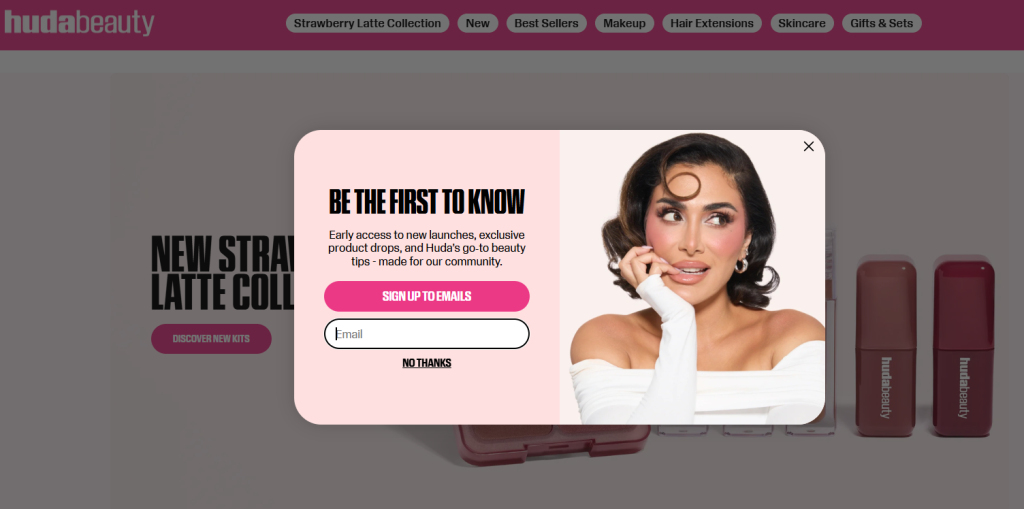
Here’s an example from Huda Beauty:
Here is why interstitial popups matter for your business:
- Conversion leverage: You are already paying for every visitor through ads, SEO, or content. Interstitials help you convert more of that traffic without increasing spend.
- Timing control: You decide exactly when the popup appears, after scroll depth, on exit intent, after time on page, or between page transitions.
- Audience specificity: You can show different messages to first-time visitors, returning customers, cart abandoners, and traffic from specific campaigns.
- Lead capture velocity: Email signups, demo requests, content downloads, and product inquiries all increase when you add a well-designed interstitial to the right page.
- Cart recovery: For e-commerce, an exit-intent interstitial is often the last line of defense before a customer disappears.
- Multi-site scale: Marketers managing several websites can run centralized popup campaigns across all domains from a single tool.
Picreel is built specifically around these outcomes, helping businesses go from passive traffic to active lead pipelines without complex development.
How Interstitial Popups Are Different From Regular Popups
I get this question a lot: “Is an interstitial the same as a lightbox popup or a modal?”
Not exactly. Here is how they differ:
| Type | Size | Timing | Overlay? | Best For |
| Interstitial Popup | Full-screen or near full-screen | Page transitions, exit intent, session milestones | Yes, blocks background | Lead capture, major promotions, exit recovery |
| Lightbox / Modal | Medium, centered box | Scroll depth, time delay | Yes, dims background | Email signups, content offers |
| Slide-In | Small, corner or side | Scroll trigger, time delay | No | Soft nudges, secondary CTAs |
| Nanobar | Thin top or bottom bar | Persistent or delayed | No | Announcements, coupon codes |
| Popunder | Behind main window | Page load | Background | Ad networks (not recommended for UX) |
| Banner Ad | Thin horizontal or vertical strip | Persistent during browsing | No | Continuous brand visibility, ad monetization, low-disruption campaigns |
| Rewarded Interstitial | Full-screen | User-initiated after an action or milestone | Yes, but voluntary | App engagement, rewarded experiences, gaming and mobile apps |
The key distinction with interstitials is scale and intent. When you want to make a bold conversion moment, especially around exits, page transitions, or critical offers, interstitials are built for that job.
8 High-Converting Use Cases for Interstitial Popups
Here is where I see the best ROI for interstitial popups across different business types. Each use case below maps to a specific trigger, offer, and result so you can match the right format to your current goal.
| Use Case | Best Trigger | Offer to Show | Expected Result | Best For |
| Exit-Intent Lead Capture | Cursor moves toward browser tab or back button | Free resource, discount, or “before you go” message | Recovers 10 to 15% of abandoning visitors into subscribers or leads | All business types |
| Cart Abandonment Recovery | Exit intent on cart or checkout page | Discount code, free shipping, or scarcity message like “Only 3 left” | Recovers 5 to 10% of the ~70% of carts that get abandoned | Ecommerce |
| Email List Growth | 50 to 60% scroll depth or 30 to 45 seconds on page | Newsletter signup with a clear value proposition: tips, resources, or a lead magnet | Picreel customers accelerate list growth by 50% or more using Smart Popup Triggers | Blogs, content sites, SaaS |
| Promotional Announcements | Page load for returning visitors or UTM parameter match | Limited-time sale, launch announcement, or event registration | High click-through on time-sensitive offers when the audience is already warm | Ecommerce flash sales, SaaS launches, agency promos |
| Content Gating and Lead Magnets | Bottom of article (90%+ scroll depth) | Downloadable version, checklist, or template in exchange for email | Higher conversion than early-trigger popups because visitor interest is already proven | Blogs, publishers, B2B content hubs |
| Upsell and Cross-Sell | After purchase confirmation or high-intent product page visit | Complementary product, bundle deal, or loyalty program signup | Increases average order value without additional ad spend | Ecommerce, SaaS with tiered pricing |
| Demo or Consultation Requests | 60 seconds on pricing or features page | “Want a 15-minute demo?” or “Talk to a real human today” | Converts high-intent visitors who are evaluating but not yet committing | B2B SaaS, agencies, service businesses |
| Traffic Redirection Across Sites | Referral source or UTM parameter from a specific campaign | “You might also love this” message with a link to a related property or offer | Increases cross-site engagement and reduces traffic dead-ends | Media companies, publishers, multi-brand businesses |
How to Implement Interstitial Popups Without a Developer
One of the most consistent pain points I hear from marketers is dependence on engineering teams for popup implementation. Here is how to go live without writing a single line of code, using Picreel on WordPress as the reference workflow.
The same logic applies whether you are on Shopify, a custom CMS, or any site where you can drop in a script tag.
By the end of these steps, you will have a live, behavior-triggered interstitial popup running on your site that collects leads, connects to your email platform, and stays GDPR-compliant without touching code.
Step 1: Define Your Conversion Goal First
Before I even open a popup tool, I decide exactly what the popup needs to achieve. One goal. Not multiple.
That goal directly decides the popup type, trigger, and offer you build. Get this wrong and the entire campaign underperforms regardless of how good the design looks.
For most sites, the goal is one of these:
- Growing an email list through lead capture
- Recovering abandoning visitors on product or cart pages
- Promoting a time-sensitive offer or content upgrade
- Capturing feedback through a survey popup
- Redirecting traffic from one site to another
If you are unsure which goal fits your current traffic, use this prompt before opening Picreel:
“I run a [type of business]. My goal is [goal]. My target audience is [audience]. Suggest the best popup type, trigger, and offer ideas.”
I have used this framing dozens of times before building campaigns for clients, and it consistently cuts setup time in half.
Step 2: Install Picreel and Connect It to Your Site
Here are some ways to do so:
WordPress: Go to your WordPress dashboard, navigate to Plugins, click Add New, and search for WordPress popup plugin. Install and activate it. Once activated, sign in to your Picreel account from the plugin dashboard and connect your site. No theme edits. No script tags. No manual code injection.
Google Tag Manager: Add the Picreel tracking script once through a GTM container tag. After that, every popup campaign you create, modify, or pause happens entirely in the Picreel dashboard. No developer needed after the initial setup, which takes about 10 minutes.
Shopify: Install from the Shopify app store. Picreel connects to your store data automatically, enabling cart-based and product-based targeting without any additional configuration.
Direct script embed: If you or a developer can add a single JavaScript snippet to your site header once, every popup after that is managed in Picreel’s no-code interface.
Step 3: Create Your Popup Campaign
Inside the Picreel dashboard, create a new campaign. You have two paths, depending on how quickly you want to move:
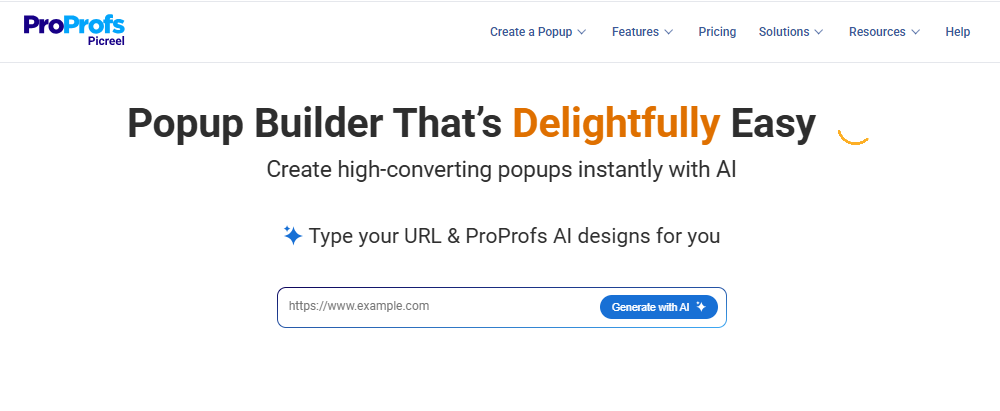
AI Popup Builder: Enter your website URL and campaign goal. Picreel’s AI generates a ready-to-use popup with a layout, copy, and CTA matched to your objective. This is the fastest starting point for new campaigns.
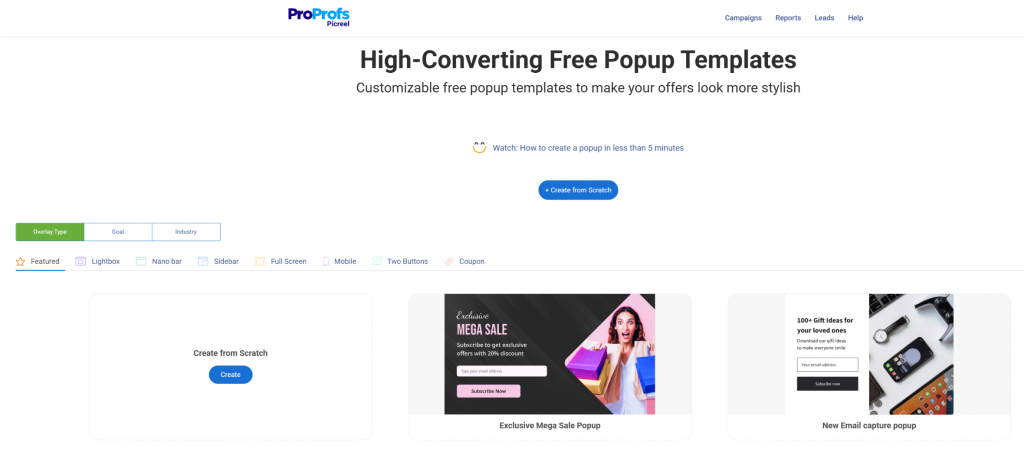
Template library: Choose from 100+ templates covering lightbox popups, slide-ins, nanobars, full-screen overlays, exit surveys, and more. Pick the format that fits your goal and edit from there using the Drag and Drop Popup Builder.
I always start with a single, clear goal. A popup trying to accomplish two things at once splits attention and converts poorly.
Step 4: Customize the Popup Design
A good popup design looks clean, reflects your brand, and does not feel like a roadblock. Here is what I focus on at this stage:
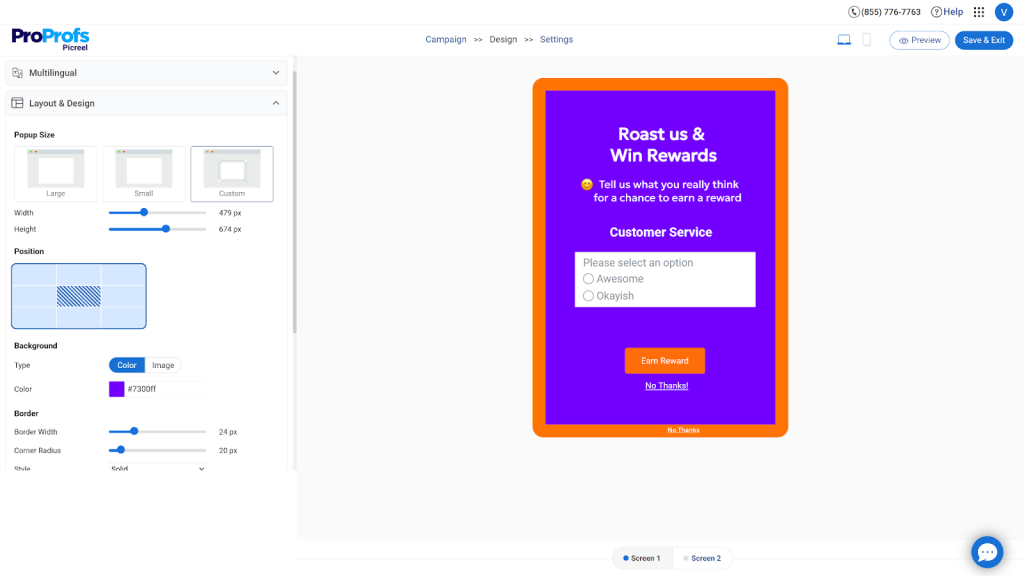
- Background and contrast: Go for a white or light background with a high-contrast CTA button in your brand’s primary color. The button should be impossible to miss.
- Form fields: Name and email are the sweet spot. Every field you add beyond email reduces your opt-in rate. If segmentation matters, add one checkbox option like “What topics interest you most?” rather than a third text field.
- CTA copy: Drop generic text like “Subscribe” or “Submit.” Use action-based copy that reflects exactly what the visitor gets: “Send Me the Guide,” “Get My Discount,” “Yes, I Want In.”
- Close button: Always place it visibly in the top-right corner. A hidden close icon creates frustration, not conversions.
- Mobile compliance: Keep your popup under 75 to 80% of the viewport on mobile. Google actively penalizes pages where popups block content on small screens. Use Picreel’s separate mobile preview to edit the mobile version independently from desktop.
- Animation: A gentle fade-in beats a jarring bounce or slide. The smoother the entrance, the less it disrupts the reading experience.
Once everything looks right, click Save.
Step 5: Configure Triggers and Targeting Rules
This is the step most people underinvest in, and it is where the real conversion difference is made. Timing and targeting are what separate a popup that feels helpful from one that feels like spam.
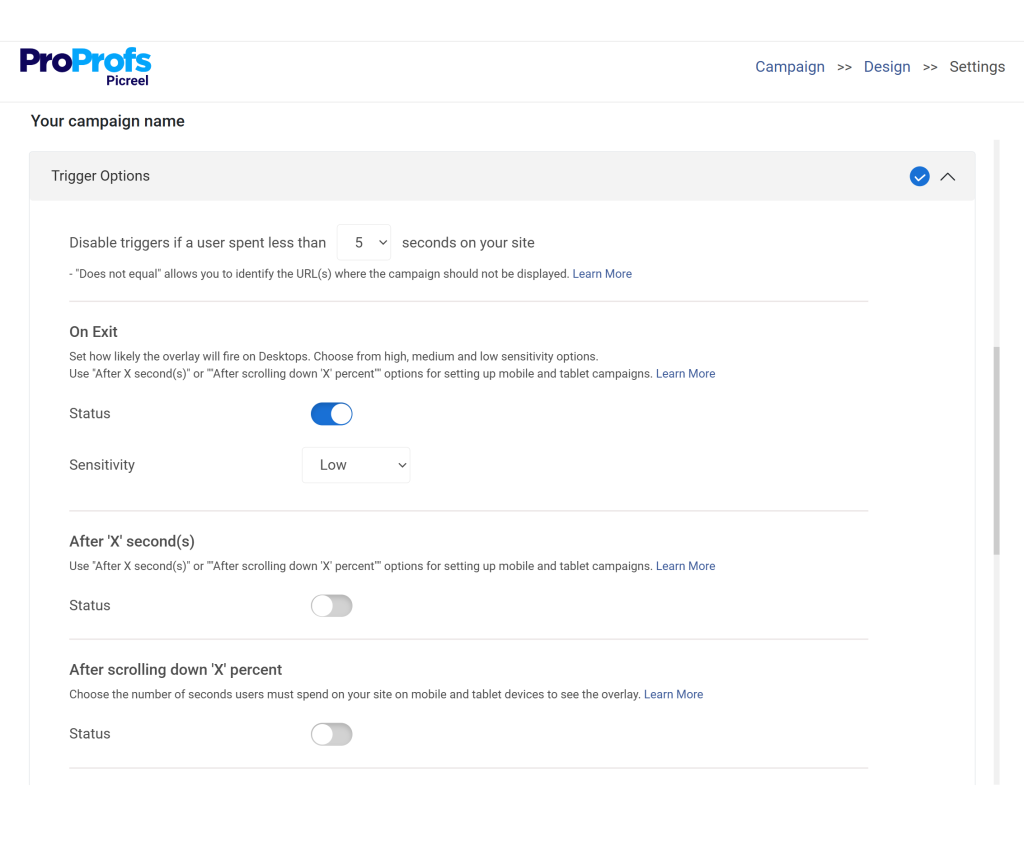
Triggers to configure:
- Exit Intent Triggers: Fires when a visitor moves their cursor toward the browser tab, signaling they are about to leave. Picreel’s exit intent analyzes mouse movement, browsing rhythm, and scroll velocity to predict abandonment before it happens, so the popup fires at precisely the right moment.
- Scroll depth (50% or more): Show the popup after a visitor has scrolled at least halfway down the page. At that point, they have read enough to be genuinely interested. Triggering at 20% scroll is too early.
- Time delay (15 to 25 seconds): Let the visitor settle in before anything appears. Less than five seconds is the most common timing mistake I see on client sites.
- On-click: Ideal for sidebar CTAs or inline blog links. The visitor opts in through intent rather than surprise.
- UTM parameter match: Show specific offers to visitors arriving from specific campaigns. A visitor from a Facebook ad for a 20% discount should see that exact offer continued on your site.
- Page transition: Fires between pages, similar to how app interstitials work between game levels. Works well for multi-page content hubs.
Targeting rules to configure:
- Show to new visitors only, or create a separate personalized offer for returning visitors using Picreel’s Advanced Targeting
- Use geo-targeting for location-specific campaigns, shipping thresholds, or language-matched messaging
- Target specific pages only. A popup about an email marketing checklist should only appear on email-related content, not on your pricing or checkout page
- Set impression frequency to once per session at minimum, using Picreel’s cookie-based suppression
- Suppress the popup for users who have already subscribed or converted
Here are the frequency settings I use as a baseline:
| Setting | Recommended Value |
| Show popup after X seconds | 15 to 25 seconds |
| Frequency cap per visitor | Once every 7 days |
| Hide after form submission | Always |
| Exit intent delay after last shown | 3 days |
If you have EU visitors, add a GDPR consent checkbox to your popup form and keep it unchecked by default. Picreel has this as a built-in field option. Pair it with double opt-in to improve list quality and deliverability.

With Picreel’s Smart Popup Triggers, you can combine any of these rules to create logic like “show only to visitors who have scrolled 60% AND have been on the page for 45 seconds AND have NOT seen this popup in the last 5 days.” That level of control is what separates high-converting campaigns from annoying ones.
Step 6: Connect Your Email Platform or CRM and Go Live
Getting your popup integration right from day one saves hours of manual work later. Go to the Integrations tab inside your Picreel campaign.
Picreel connects natively with Mailchimp, Klaviyo, ActiveCampaign, HubSpot, Marketo, AWeber, Constant Contact, Salesforce, Shopify, WooCommerce, Magento, Zapier, Google Analytics, Google Tag Manager, and 30+ other platforms.
Select your email tool, authenticate with your API key, and map your form fields to the correct list or audience segment.

A few things worth doing before you hit publish:
- Tag new subscribers at the source: Apply a tag when someone joins via a specific popup campaign, like “exit-intent-blog” or “cart-recovery-checkout.” Tags let you segment and message these subscribers differently from leads that came through other channels.
- Set up a welcome sequence before launch: A subscriber who signs up and hears nothing for two weeks is a subscriber who marks you as spam. Even a two-email welcome sequence makes a measurable difference to early engagement. Use this prompt to build one quickly:
“Create a 2-email welcome sequence for new subscribers who signed up through a popup. The first email should deliver the promised offer immediately and build trust. The second email, sent three days later, should focus on engagement, value, and encouraging the next step. Tone: friendly, concise, and personalized for [target audience] in [industry]. Include subject lines and clear CTAs.”
- For multi-site setups: One Picreel account manages multiple domains from a single dashboard, which is far more scalable than managing separate installations per site.
Once your integration is confirmed and your welcome sequence is ready, publish the campaign.
Step 7: Track, Test, and Improve
Your first popup will not be your best one. The sites I have seen grow their email lists fastest treat their popup as a living campaign, not a set-it-and-forget-it installation.
Monitor views, clicks, and form submissions weekly using Picreel’s Real-Time Analytics. A drop-off between impressions and clicks usually signals a copy or offer problem. A drop-off between clicks and submissions usually signals form friction or a trust issue.
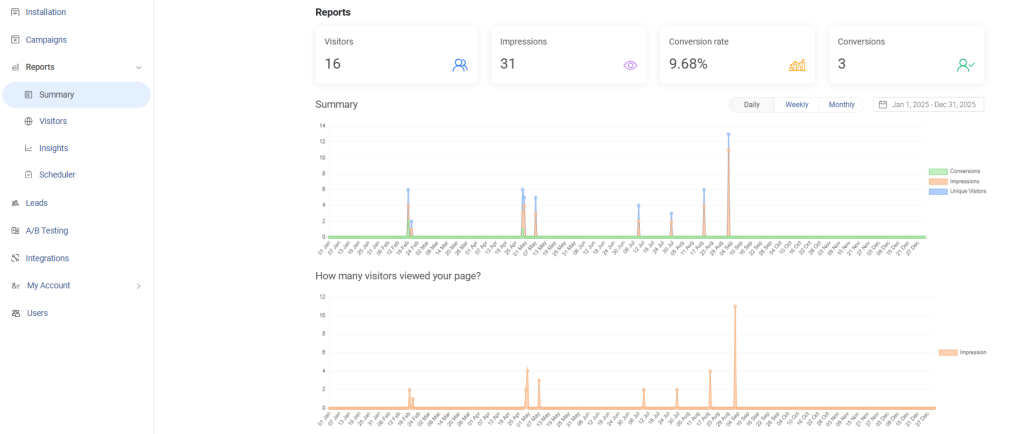
Use Picreel’s A/B Testing to run clean split tests on one variable at a time: headline copy, CTA text, trigger timing, or offer type. I have seen headline changes alone move conversion rate by 20 to 40%. You can also use A/B Test Trigger Combinations to find the optimal timing setup, not just the best design.

Track conversion rates by page. A popup converting at 6% on blog posts and 1% on product pages is telling you something specific about what visitors on each page are ready for.
Refresh your popup content every six to eight weeks. Returning visitors develop popup blindness to an offer they have seen multiple times. A new headline or updated visual resets that.
FREE. All Features. FOREVER!
Try our Forever FREE account with all premium features!
How Do You Write Interstitial Popup Copy That Actually Gets Clicks?
Design matters. But copy closes. Here is what works in interstitial popup copy:
Headline rules:
- Lead with the benefit, not the feature. “Get 20% off your first order” beats “Sign up for our newsletter.”
- Use numbers when possible. “Save $15 today” outperforms “Save money today.”
- Keep it under 10 words. The longer the headline, the lower the conversion.
CTA button rules:
- First person performs better. “Start My Free Trial” converts better than “Start Your Free Trial.”
- Be specific. “Get My Free Guide” outperforms “Submit.”
- One CTA per popup. Every additional option reduces conversion.
Body copy rules:
- One sentence maximum for the supporting line under the headline.
- Reinforce the benefit, not the process.
- If you need to explain, your offer is probably too complicated.
The “no thanks” link:
- Always include a clear close option. Write it in a way that reinforces the benefit: “No thanks, I don’t want more leads” creates mild psychological friction that actually improves conversion.
- Make the close button visible and accessible. This is also required for Google compliance.
How Can You Use Interstitial Popups Without Hurting SEO?
This is the section most popup guides skip or water down. I want to give you the full picture.
Google has specifically penalized intrusive interstitials on mobile since 2017. The rule targets popups that cover the main content immediately when a user arrives from search results. Violating this can hurt your mobile rankings.
What Google penalizes:
- Popups that appear immediately on page load and cover the main content
- Interstitials that cannot be easily dismissed
- Content that requires completing a popup before you can access the page content
- Sticky popups that take up more than 20% of the screen and persist while scrolling
What Google explicitly allows:
- Popups required for legal compliance (cookie consent, GDPR, age verification)
- Login dialogs for paywalled content
- Small, easily dismissible banners
- Popups triggered by user action, not by page load
- Exit-intent popups (user is already leaving, no content is being blocked)
- Scroll-triggered popups (user has already consumed the content)
- Time-delayed popups (user has already engaged)
The practical SEO-safe popup checklist:
- Trigger after exit intent, scroll depth (50%+), or time on page (30+ seconds)
- Include a clearly visible close button (minimum 44px for mobile tap targets)
- Allow ESC key to close the popup
- Allow clicking outside the popup to dismiss it
- Never block the main content immediately on landing page visits from search
- Set frequency caps so returning visitors are not bombarded
- Test Core Web Vitals after implementing popups to check for layout shift (CLS) or load time (LCP) impact
Tools like Picreel are designed with these compliance considerations built in, so you are not accidentally triggering penalties while trying to capture leads.
What Are the Best Practices for Mobile-Friendly Interstitial Popups?
Mobile traffic accounts for more than half of global web visits. If your popups are not built for mobile, you are both losing conversions and risking SEO penalties.
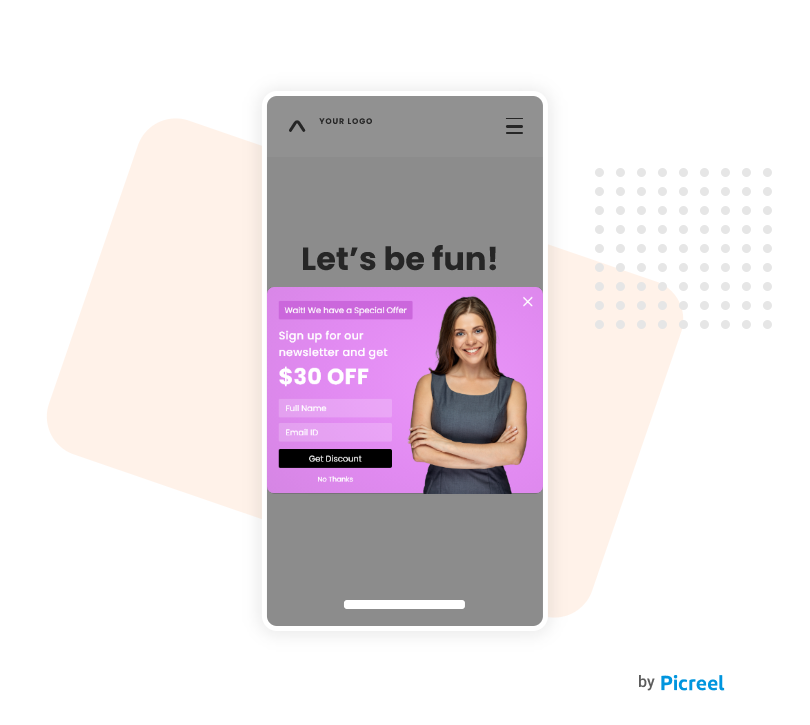
Mobile popup rules I follow:
- Size: Keep mobile popups to no more than 75 to 80% of the screen height. Leave visible content showing behind the popup.
- Form fields: Limit to one or two fields maximum. Every additional field drops mobile conversion.
- CTA button size: Minimum 44 x 44 pixels for thumb accessibility.
- Font size: Minimum 16px body text. Do not shrink copy to fit more text.
- Close button placement: Top right corner, clearly visible, minimum 44px tap area.
- Avoid popup stacking: Never trigger multiple popups in a single mobile session.
- Test on real devices: Emulators do not replicate real-world mobile behavior. Test on actual phones.
Picreel’s Drag and Drop Popup Builder includes separate mobile preview and editing, so you can design the desktop and mobile versions independently without any coding.
How Do You A/B Test Interstitial Popups for Higher Conversions?
If you are not A/B testing your popups, you are optimizing by guessing. I always tell my team: the first version of any popup is a hypothesis. The data tells you what is actually true.
Here’s a quick video walking you through exactly how to A/B test popups. See how you can create your first two variations, target the right audience, and analyze your results. Watch it here:
What to test, in priority order:
- Headline: The single biggest lever. Test benefit-led vs. curiosity-led vs. urgency-led headlines.
- Offer: Free shipping vs. percentage discount vs. dollar discount vs. free resource.
- CTA copy: “Get My Discount” vs. “Claim Offer” vs. “Start Free Trial.”
- Trigger timing: Exit intent vs. 45-second delay vs. 60% scroll depth.
- Popup design: Background color, image vs. no image, with vs. without form.
- Form length: Single email field vs. name and email vs. multi-step.
How to run a proper popup A/B test:
- Run only one variable change at a time. Testing two things simultaneously makes results unreadable.
- Wait for statistical significance. Minimum 200 conversions per variant before drawing conclusions.
- Track micro-conversions (popup views, clicks) as well as macro-conversions (actual signups or purchases).
- Document your tests and results. Build a conversion knowledge base for your site over time.
Picreel’s A/B Testing feature lets you run these tests across all popup types without touching your codebase. You can also use A/B Test Trigger Combinations to find the optimal timing setup, not just the best design.
FREE. All Features. FOREVER!
Try our Forever FREE account with all premium features!
Which Interstitial Popup Metrics Should You Track to Improve Performance?
Running popups without tracking is guesswork at scale. Here are the metrics that matter:
| Metric | What It Tells You | Benchmark |
| Impression Rate | % of visitors who saw the popup | Should match your targeting scope |
| Conversion Rate | % of impressions that resulted in action | 3 to 5% is average; 10%+ is excellent |
| Close Rate | % of visitors who dismissed without converting | High close rate = wrong offer, timing, or audience |
| Click-Through Rate (CTR) | % who clicked the CTA | Below 2% means headline or offer needs work |
| Bounce Rate After Popup | Did the popup cause visitors to leave? | Spike = popup is hurting UX |
| Revenue Per Popup Impression | For ecommerce: total revenue generated per popup view | Best measure of commercial ROI |
| Email Capture Rate | Signups as a % of popup impressions | 5 to 8% is solid for lead gen popups |
Picreel’s Real-Time Analytics dashboard tracks visits, impressions, and conversion rates live, so you can catch underperforming popups quickly and adjust before you burn through traffic.
8 Common Interstitial Popup Mistakes That Kill Conversions
I have reviewed hundreds of popup campaigns over the years. The good news is that most conversion problems come down to the same repeatable mistakes. Here is what I see constantly, and exactly how to fix each one.
1. Showing the Popup Immediately on Page Load
Visitors have not consumed any content yet. They do not know you, trust you, or understand your offer. Firing a popup in the first three seconds almost always triggers an instant close or a bounce.
Fix:
- Use exit intent, scroll depth (50%+), or a 15 to 25 second time delay instead
- Match the trigger to the page: blog posts work well with scroll triggers; product pages work better with exit intent
- Think of the popup as a reward for engagement, not a greeting at the door
2. Using a Weak or Vague Offer
“Sign up for updates” is not an offer. Visitors do not hand over their email for the privilege of receiving more emails. You need to give them something specific, useful, and immediately valuable.
Fix:
- Replace “subscribe” messaging with a concrete benefit: “Get the free 10-point conversion checklist.”
- Match the offer to the page context: a blog post about email marketing should offer an email marketing resource
- If your offer needs more than one sentence to explain, it is probably too complicated
3. Making the Close Button Invisible or Delayed
A hard-to-close popup does not create conversions. It creates frustration. Visitors who cannot close a popup quickly will either bounce or develop popup blindness that affects every future campaign you run.
Fix:
- Place the close button visibly in the top-right corner, minimum 44px for mobile tap targets
- Never use a delayed close button. Holding a visitor hostage for 5 seconds does not improve conversion
- Also allow ESC key dismissal and clicking outside the popup to close it
4. No Frequency Capping
Showing the same popup to the same visitor every time they return is the fastest way to train them to ignore it permanently. Worse, it signals to Google that you are prioritizing pop-up volume over user experience.
Fix:
- Set a minimum frequency cap of once per day, ideally once every 5 to 7 days for the same offer
- Suppress the popup entirely for visitors who have already converted or subscribed
- Use Picreel’s cookie-based suppression rules to handle this automatically
5. Identical Popup for Every Visitor
If a customer who bought from you last week sees the same first-time-visitor welcome discount popup, you have wasted an impression and signaled that you do not know them. Personalization is not a nice-to-have anymore.
Fix:
- Segment at a minimum between new visitors, returning visitors, and existing customers
- Show different offers based on the page the visitor is on, their traffic source, or their device type
- Use Picreel’s Advanced Targeting to create audience rules without writing any code
6. Testing Too Many Variables at Once
A/B tests with multiple simultaneous changes produce data you cannot act on. If you change the headline, the CTA, and the trigger timing in the same test and conversion goes up, you have no idea what drove the result.
Fix:
- Change one variable per test: headline copy, CTA text, trigger timing, or offer type
- Wait for at least 200 conversions per variant before drawing conclusions
- Document every test result so you build a knowledge base instead of starting from scratch each time
7. Ignoring Mobile Optimization
More than half of global web traffic is mobile. A desktop popup that is not built for small screens will cover the entire viewport, be nearly impossible to close with a thumb, and likely trigger Google’s intrusive interstitial penalty on mobile search.
Fix:
- Keep the mobile popup height under 75 to 80% of the viewport
- Limit form fields to one or two on mobile
- Use Picreel’s separate mobile preview and editing to design desktop and mobile versions independently
- Always test on a real device, not a browser emulator
8. No Integration With Email or CRM
A popup that captures an email address into a spreadsheet with no automation behind it is not lead generation. It is data collection with no follow-up, which means most of those leads go cold before anyone acts on them.
Fix:
- Connect your popup tool to Klaviyo, Mailchimp, HubSpot, or your CRM before you publish the campaign
- Tag leads by popup source so you can segment and message them differently from other list sources
- Set up at minimum a two-email welcome sequence before launch so every new subscriber hears from you within 24 hours
How to Use Interstitial Popups for User Segmentation
One underused feature of interstitial popups is using visitor responses to segment them for downstream marketing. Here is how it works. I have also added some interstitial popup examples for more clarity.
1. Two-Step Segmentation Popups
In the first step, ask a qualifying question. For example:
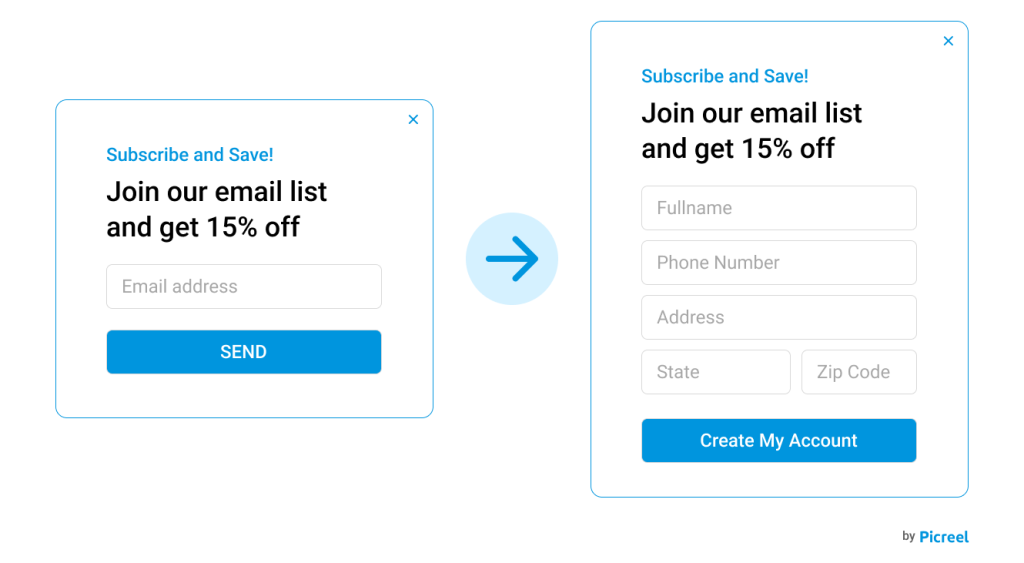
- “What best describes your business?” with options like E-commerce, SaaS, Agency, Other.
- “What are you most interested in?” with options for specific product categories.
In the second step, collect the email based on their response.
Now you have a segmented lead. Route them to the right email list, the right sales rep, or the right onboarding sequence automatically.
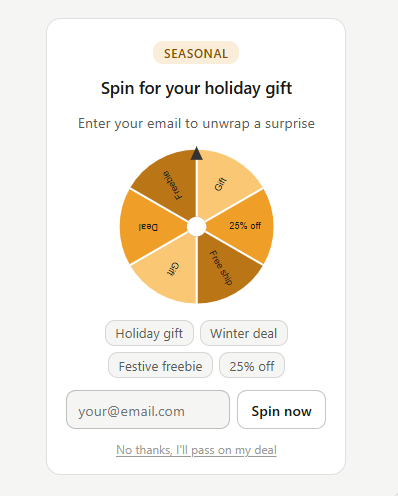
2. Checkbox-Based Lead Capture
Add checkboxes to your popup form asking which topics or products the visitor is interested in. Connect those responses to Klaviyo or ActiveCampaign tags for hyper-personalized email sequences.
3. Survey-Style Exit Popups
When a visitor is about to leave without converting, trigger a short one-question popup: “What stopped you from signing up today?” with multiple-choice answers. This gives you qualitative data on why people are not converting, which you can use to fix your offer, pricing, or messaging.
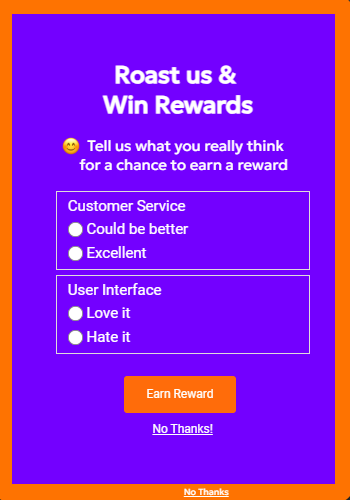
Picreel supports multi-step popup forms and checkbox fields, making segmentation-based lead capture possible without custom development.
Turn More Visitors Into Leads With Smarter Interstitial Popups
Interstitial popups work best when they feel timely, relevant, and genuinely useful, not disruptive. The biggest takeaway is simple: trigger the right message at the right moment. Whether it’s an exit-intent offer, a cart recovery popup, or a lead magnet tied to the page content, smart targeting consistently drives better conversions without hurting user experience.
The key is balancing visibility with usability while continuously testing headlines, offers, and triggers to improve performance. If you want a practical way to implement all of this without relying on developers, Picreel makes the process incredibly easy.
From AI-powered popup creation and advanced targeting to A/B testing, CRM integrations, and mobile-friendly designs, it gives you everything needed to turn passive visitors into qualified leads. Start by identifying one conversion goal, launch your first targeted popup campaign in Picreel, and track the results in real time.
Frequently Asked Questions
Are interstitial popups bad for SEO?
Not when implemented correctly. Google penalizes intrusive interstitials that cover content immediately when a user arrives from search results on mobile. However, exit-intent popups, scroll-triggered popups, and time-delayed popups are not penalized. Legal compliance popups like cookie consent and age gates are explicitly exempt.
What is the best time to show an interstitial popup?
Exit intent performs best for retention and lead recovery. Scroll depth of 50 to 75% works well for content offers and email signups. Time-on-page delays of 30 to 60 seconds are effective for engaged visitors on video or image-heavy pages. The right trigger depends on your goal and your audience behavior.
How do I stop interstitial popups from hurting user experience?
Use behavioral triggers instead of immediate page-load triggers. Set frequency caps so the same visitor does not see the same popup repeatedly. Include a clearly visible close button. Match the offer to what the visitor is actually interested in, based on the page they are on and their behavior.
What is exit-intent detection in popups?
Exit intent is a behavioral tracking technology that detects when a visitor's mouse cursor moves toward the browser tab, address bar, or browser edge, signaling they are about to leave. The popup fires at that exact moment, giving you one last chance to capture the lead or recover the cart.
How do interstitial popups increase conversions?
They create a dedicated conversion moment inside the session rather than relying on the visitor to find and click a CTA themselves. Triggered at the right time with a relevant offer, interstitials significantly outperform passive conversion elements like sidebar forms or footer signups.
How do I reduce cart abandonment using interstitial popups?
Trigger an exit-intent interstitial on cart and checkout pages. Offer a discount, free shipping, or urgency-based message. Connect the popup to Klaviyo or your email platform to follow up with visitors who still leave. This combination typically recovers between 5 and 10% of abandoning carts.
What should I put in an interstitial popup?
A strong, specific headline focused on a clear benefit. A one-sentence supporting line. A single CTA button with first-person copy. An email field or a single form field if you are capturing a lead. A visible close option. Avoid multiple CTAs, long copy, or complex forms.
How do I integrate interstitial popups with Klaviyo?
Connect your interstitial page popup tool to Klaviyo through a native integration or Zapier. Route new popup captures into specific Klaviyo lists. Tag leads by popup campaign type, offer, or page. Use those tags to trigger relevant email flows, welcome sequences, or cart recovery automations.
What popup triggers work best for ecommerce?
Exit intent on product pages and checkout pages performs best for cart abandonment recovery. Scroll-triggered popups at 60% depth work well for product detail pages for upsells and review-based social proof offers. UTM-based triggers are highly effective for visitors arriving from paid campaigns.
How do I segment visitors using popup responses?
Use multi-step interstitial webpage popup forms where the first step asks a qualifying question and the second collects the email. Route responses to different lists, sequences, or CRM pipelines based on the answer. Picreel supports multi-step forms and checkbox fields for this purpose.
What is a good conversion rate for an interstitial popup?
Average interstitial webpage popup conversion rates range from 3 to 5%. A well-targeted, well-timed interstitial with a strong offer can reach 10 to 15% or higher. Exit-intent popups on checkout pages for cart recovery often outperform standard lead capture popups because the visitor intent is higher.
Can I run interstitial popups on multiple websites from one tool?
Yes, tools like Picreel support multi-site popup management, allowing you to create, manage, and analyze campaigns across multiple domains from a single dashboard. This is particularly useful for agencies, publishers, and businesses running multiple web properties.
What is the Google intrusive interstitial penalty?
Google's mobile search ranking algorithm applies a penalty to pages that show interstitials covering the main content immediately when a user arrives from search results on mobile. The fix is simple: use triggers like exit intent, scroll depth, or time delay instead of immediate page-load triggers. Legal compliance popups are exempt from this penalty.
FREE. All Features. FOREVER!
Try our Forever FREE account with all premium features!

 We'd love your feedback!
What did you like & how can we make it even better?
 Thanks for your feedback!
 Ask Your Question
Have a question? Get expert help to make your decision easier.