
Most popup software promise conversions but deliver clutter. After testing 20+ across e-commerce and SaaS sites, most fall short on the same fundamentals: design flexibility, mobile performance, trigger precision, and pricing that doesn’t punish growth.
And when tools get these wrong, it shows in the numbers.
According to Statista’s global conversion rate report, the average popup conversion rates hover around 2-4%.
Closing that gap is rarely a targeting problem. It is a creation problem. The right popup, built with the right message, is what moves the needle.
The strongest tools today understand this, which is why the best ones come with a built-in AI builder that lets you go from prompt to high-converting popup in seconds, no templates to wrestle with, no designer required.
Here’s what we’ll be discussing today:
- The right popup software captures emails, recovers cart abandoners, and converts passive traffic into leads.
- 10 best tools, real conversion benchmarks, how coupon popups work, & A/B testing insights.
10 Best Popup Software to Boost Sales
Choosing the right popup software can be tricky.
The best ones work quietly in the background, helping you grow your leads, stay mobile-friendly, connect with your CRM or website platforms, and create a smooth experience for every visitor.
Short on time? Use the comparison table below to find your fit faster.
To help you out, I’ve rounded up 10 of the best tools that do exactly that.
1. Picreel – Best for Boosting Leads, Conversions, and Sales
I found Picreel while looking for the best popup software tools that grow leads, conversions, and sales. Within the first month, I was capturing leads from traffic that previously bounced without any interaction.
The tool helps me create targeted offers and popups that instantly capture the attention of website visitors. I do that using the AI builder, wherein I just specify my popup needs, and it generates a popup in seconds. I think it’s super easy to use, even for beginners.
I think the A/B testing feature is a great way to test different popup versions and see what works best for my audience – something that boosts conversion rates.
Picreel also helps me prevent customers from abandoning their carts. With its exit-intent popups, I offer them a last chance – maybe a discount or free shipping before they leave.
Pros:
- AI-powered popup builder to generate a complete popup with copy, layout, and CTA in seconds.
- Advanced popup builder that allows users to create visually appealing and high-converting popups
- Targeted offers help increase conversion rates and reduce cart abandonment
- A/B testing and analytics features enable users to optimize popup performance
- 100+ customizable templates for quick and seamless popup creation
- Seamless integration with 700+ popular marketing platforms and CRM tools like HubSpot, Shopify, MailChimp, Marketo, etc.
Cons:
- Cloud-only – no offline access
- No dark theme
Pricing: Offers a forever-free plan for up to 5K visitors (For WordPress, you’ll need the Enterprise account). Paid plans start at $9.99/month
G2 Rating: 4.5/5
Capterra Rating: 4.9/5
See how Picreel helped Living Online increase weekly signups by 900% using exit-intent popups and personalized offers. It helped convert visitors who were about to leave into engaged subscribers.

2. OptinMonster – Best for Monetizing Website Traffic
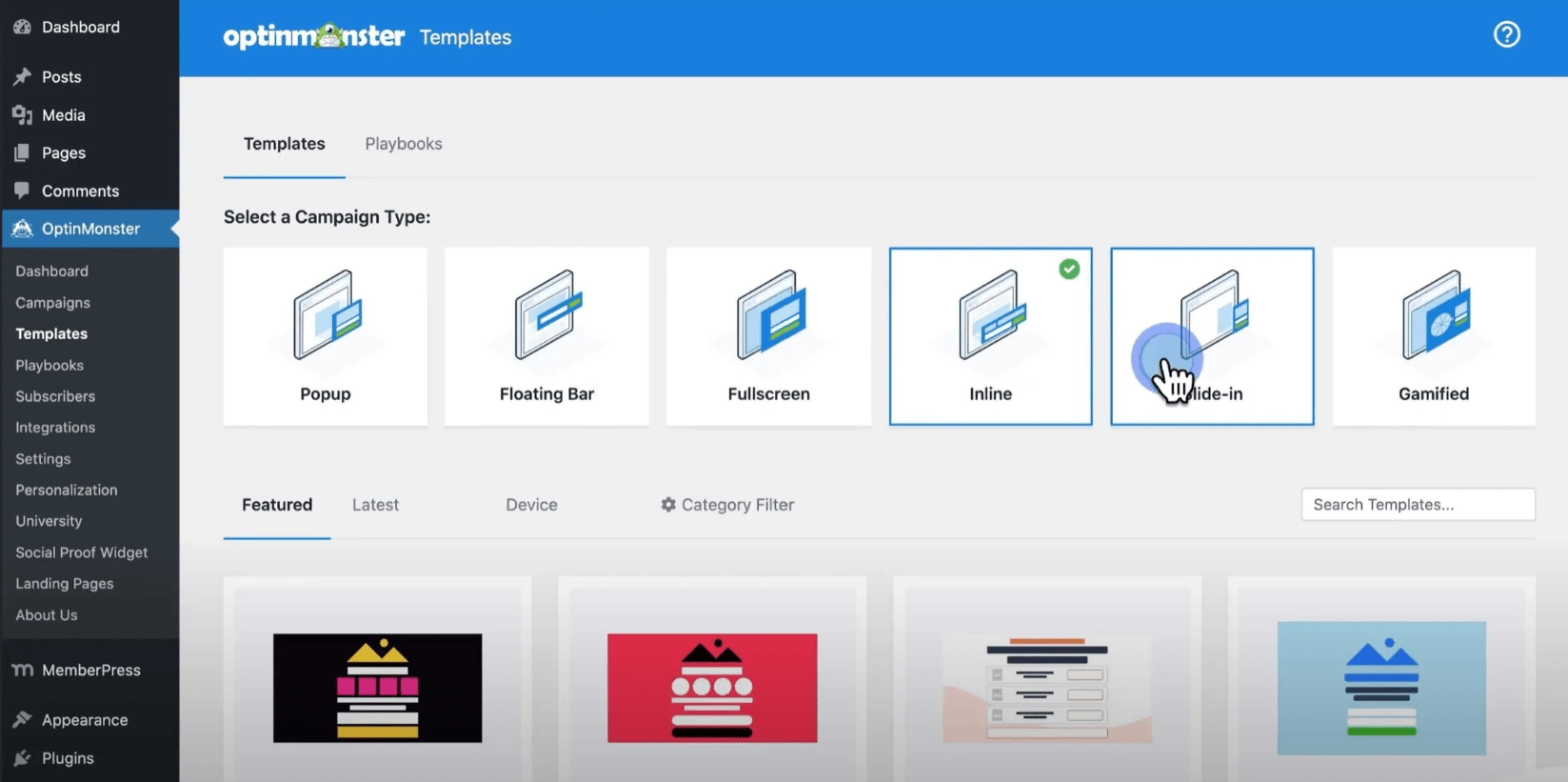
The next tool on my list is OptinMonster – a potent popup tool that monetizes website traffic. It achieves this by successfully converting your existing traffic into subscribers, leads, and sales.
The key differentiator is multi-site campaign management: one dashboard, multiple domains, targeting rules per site. It combines lead capturing with advanced behavioral automation, A/B testing, and easy integration with marketing tools.
You can use OptinMonster’s exit-intent technology to offer a discount code to visitors who are about to leave your site. This results in a significant increase in sales.
Also, I’m particularly impressed with the smart tags feature. It allows me to personalize my popups based on visitor behavior.
For example, I can show visitors who have abandoned their cart a different popup than visitors who have been browsing my site for a while.
Pros:
- Various campaign types, including lightbox popups, floating bars, welcome mats, etc.
- Allows campaign personalization based on visitors’ location, improving its effectiveness
- Actionable insights such as conversion analytics, revenue attribution, A/B testing, etc., to improve marketing strategies
- Smart triggers such as exit-intent technology, inactivity sensors, etc., display campaigns at the right time
- Optimized campaigns for mobile devices to improve user experience and increase conversions across platforms
Cons:
- Lack of a free plan might be a drawback for smaller businesses or startups
- The initial setup can be complex, including configuring integrations and customizing campaigns
Pricing: Starts at $9/month.
G2 Rating: 4.4/5
Capterra Rating: 4.2/5
3. Poptin – Best for Creating and Optimizing Engaging Popups
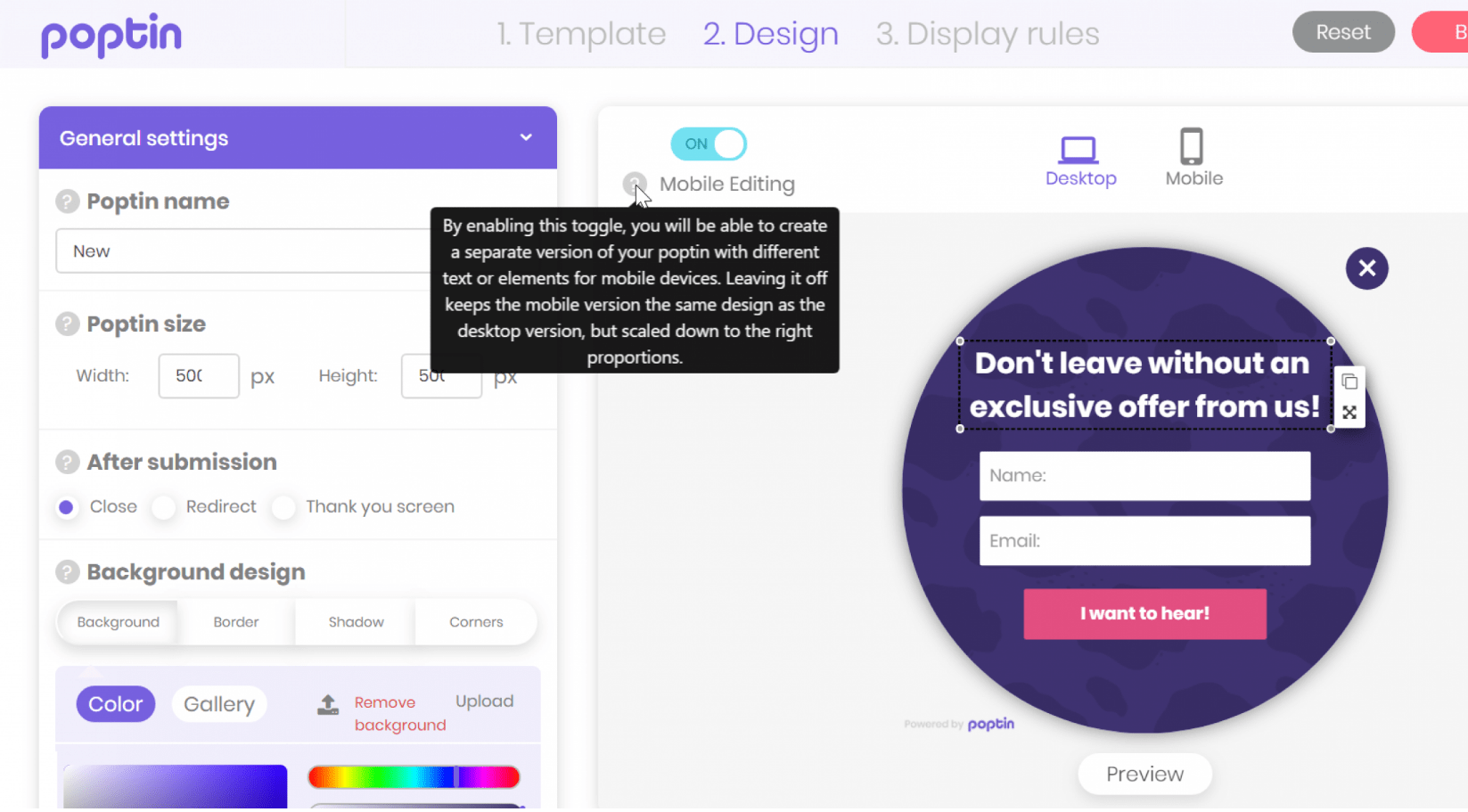
I’m impressed with Poptin as it enables you to design a variety of popup types, including classic popups, countdown popups, full-screen overlays, bars, and more. This versatility allows you to choose the perfect format for engaging with your website visitors.
One of the most practically useful features of Poptin is its user-friendly drag-and-drop editor to customize your preferred templates and forms. Even if you’re not a design expert, Poptin’s editor makes it simple to create visually appealing templates.
To make your templates even more attractive, Poptin provides an elements section with interactive and engaging components to help you capture your visitors’ attention effectively and encourage them to take the desired action.
While Poptin is relatively new, it’s worth noting that it’s regularly updated. It means you can expect ongoing improvements and enhancements to the tool’s capabilities and features.
Pros:
- Straightforward editor with versatile customization choices
- Intuitive drag-and-drop functionality for effortless design
- Multiple types of website popups to suit diverse needs
- Excellent A/B testing and analytics for data-driven optimization
- Advanced targeting options for precise audience engagement
Cons:
- The analytics doesn’t offer in-depth insights
- The template selection is more limited compared to some competitors
Price: Starts at $20/month.
G2 Rating: 4.8/5
Capterra Rating: 4.8/5
4. Sumo – Best for Email Capturing
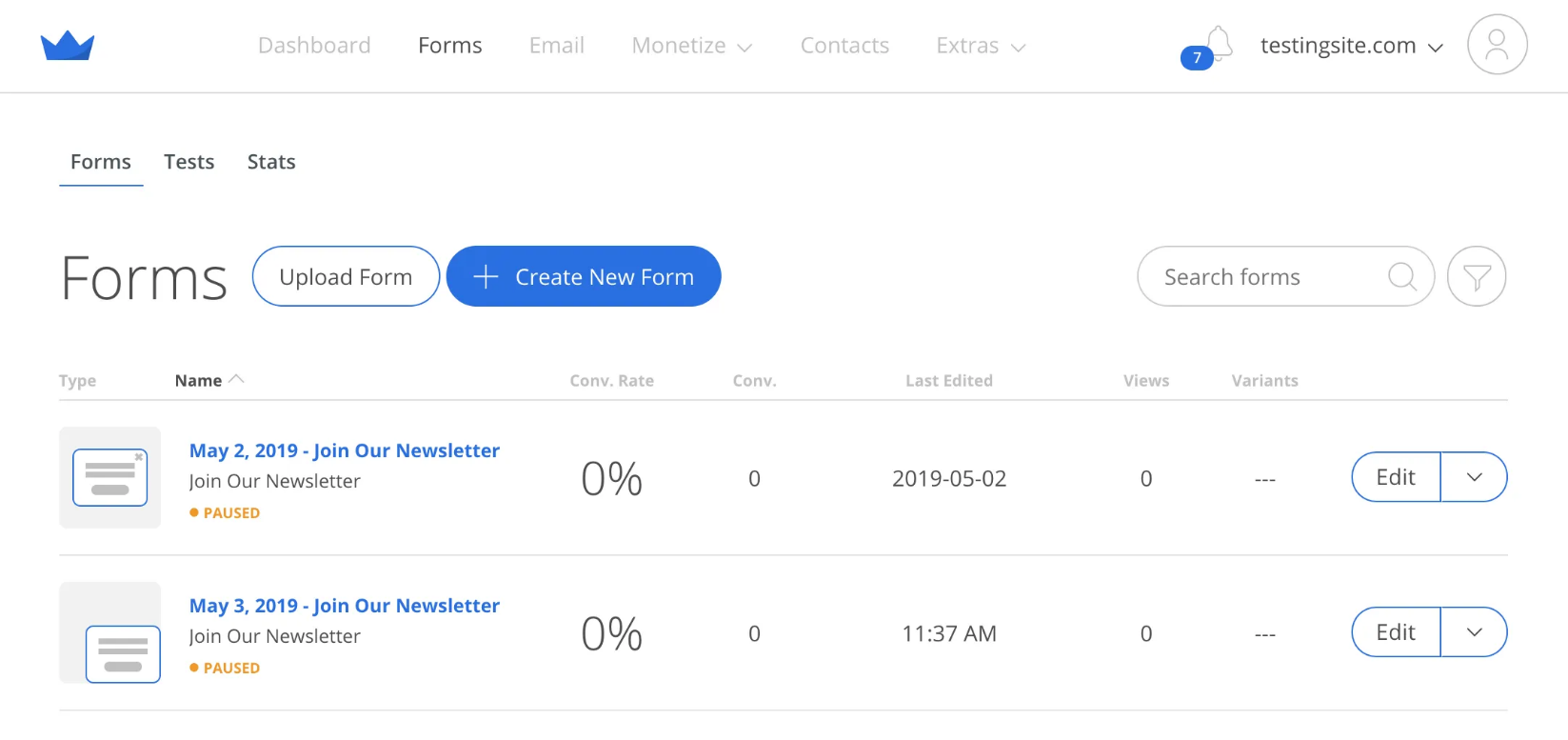
Sumo is an all-in-one email capture tool that can work as a highly reliable popup software. It has customizable opt-in forms, making it easy to create high-converting popups, scroll boxes, etc.
I like how easy it is to embed these forms on websites, launch email popups, and send automated email sequences (triggered by specific actions, such as when someone signs up for your list or visits a certain page on your website).
The ‘Boost’ button deserves a mention. This simple button can be added to any page on your website. It allows visitors to log in with their social media accounts to subscribe to your email list – pretty smart!
Pros:
- An easy-to-use email capture tool with advanced drag-and-drop functionality to create popups
- Lets you send personalized messages to prospects based on their actions, which nurtures leads and increases conversions
- Displays a full-screen call to action that shows up when visitors land on your site – called the ‘Welcome Mat’
- Allows you to create custom contact forms for your website, where you can add fields for name, email, etc.
- Displays tailored pop-ups to individual visitors, based on the specific page they are viewing
Cons:
- The free plan does not give you access to A/B testing or advanced targeting options
- You may experience occasional bugs and glitches in the UI while using Sumo
Pricing: A free plan is available for up to 10,000 monthly emails. Paid options start at $39/month.
G2 Rating: 4.0/5
Capterra Rating: 4.2/5
5. Hello Bar – Best for Boosting Visitor Engagement
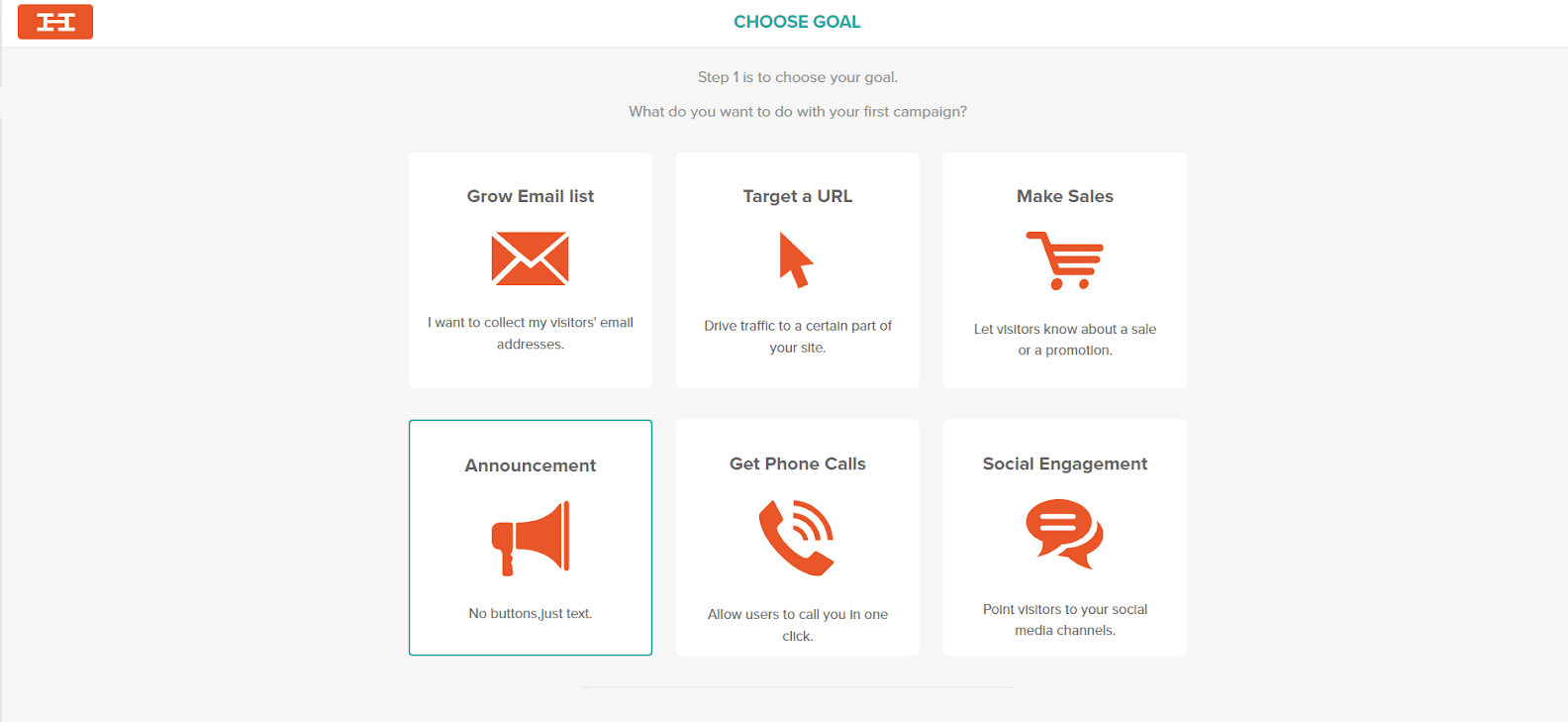
Its an excellent popup tool for businesses aiming to enhance their visitor engagement.
One of the things I love most about Hello Bar is its advanced targeting options.
I can target my messages based on a variety of factors, such as the visitor’s device, location, visit page, and even their past browsing behavior.
For example, I can create a message that only appears to visitors who have abandoned their shopping cart. Or I can create a message that only appears to visitors who are from a specific country. This helps me maximize the impact of my messages and increase visitor engagement.
Apart from these, the tool is also easy to use. So, even if you’re not tech-savvy, you can create beautiful and effective popups in minutes!
Pros:
- Diverse popups, such as header and footer bars, alerts, sliders, full-page takeovers, etc.
- A/B testing feature to see which popups perform the best and optimize campaigns
- A variety of customization options, templates, and styling options so you can create popups that match your brand and website design
- Enables you to view detailed statistics for popup viewership and conversion rates
- Offers a heatmap tool to see where visitors are clicking on your website
Cons:
- Some users report issues related to billing practices, like being charged without consent or experiencing problems with refunds
- The A/B testing feature is not included in the free plan
Pricing: A free plan is available for up to 5000 popup views. Paid options start at $29/month.
G2 Rating: 4.7/5
Capterra Rating: 4.6/5
6. Wisepops – Best for Onsite Marketing
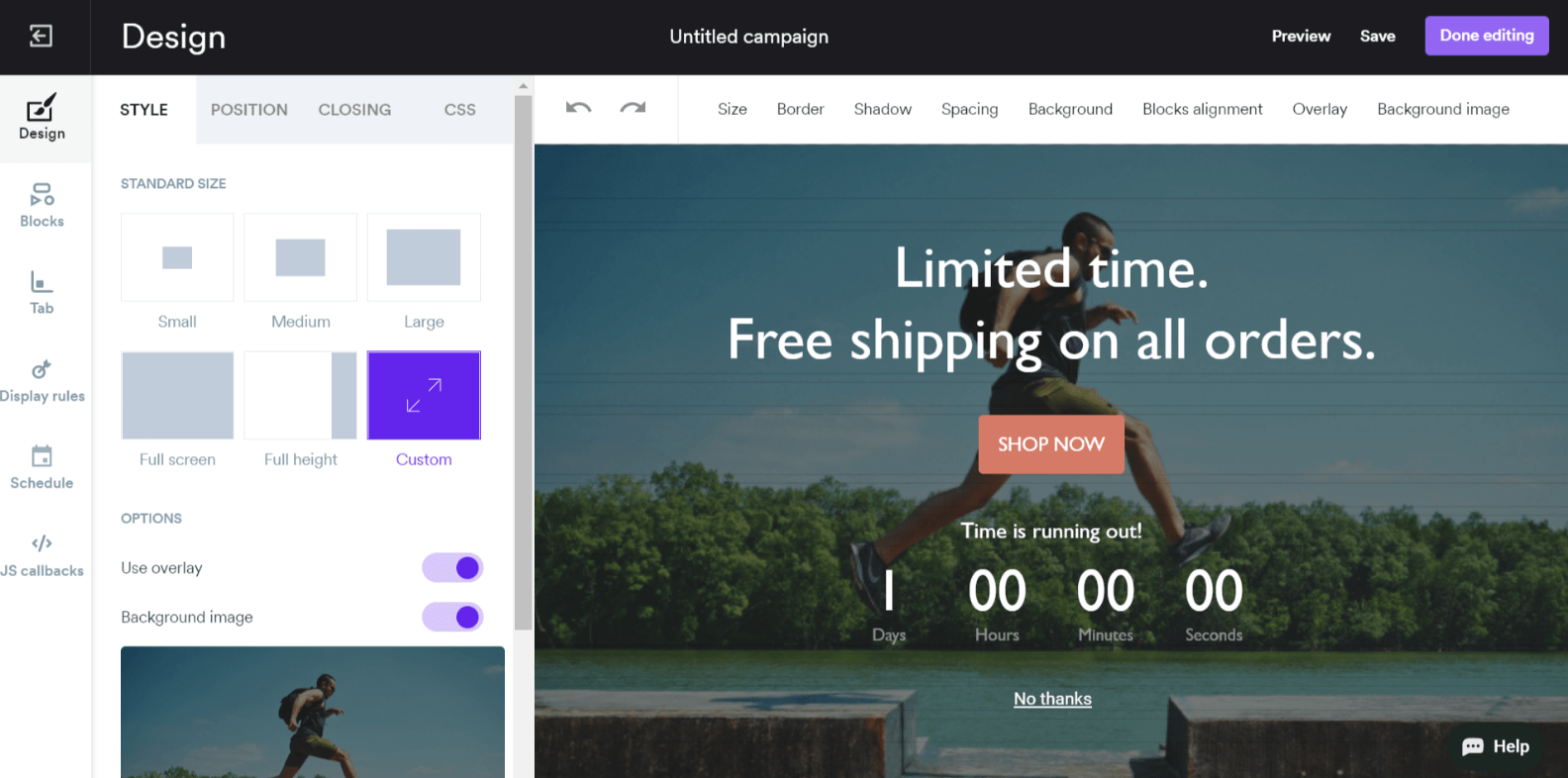
Wisepops is another great software known for its non-intrusive approach to onsite marketing.
The software offers a broad range of features, including the ability to insert videos, sign-up forms, and promotions into popups.
I can embed a video on my homepage that showcases my products or services in action. I can also create a sign-up form that appears after a visitor has spent a specific amount of time on my website, encouraging them to subscribe to my newsletter.
Unlike other tools, Wisepops lets you create contextual popups that appear to visitors based on their behavior and interests. I think it’s a pretty good tool for boosting conversions!
Pros:
- Offers a selection of ready-to-use campaigns like surveys, countdowns, spin-to-win, SMS, video, etc.
- A wide array of targeting options, including one-click to tailor campaigns to specific audience segments
- Provides multiple trigger options, such as scroll, time on site, and exit intent, to display popups at the most appropriate moment
- A/B testing feature to experiment with different popup variations
- Robust analytics and reporting capabilities that measure key metrics track conversions, and refine marketing strategies
Cons:
- Some users have reported facing occasional glitches when setting pop-up triggers
- The pricing structure can be confusing, as it is charged by page views and not by popup display, meaning you will be charged even if a popup is not triggered
Pricing: Starts at $49/month.
G2 Rating: 4.6/5
Capterra Rating: 4.9/5
7. ConvertFlow – Best for Qualifying Leads
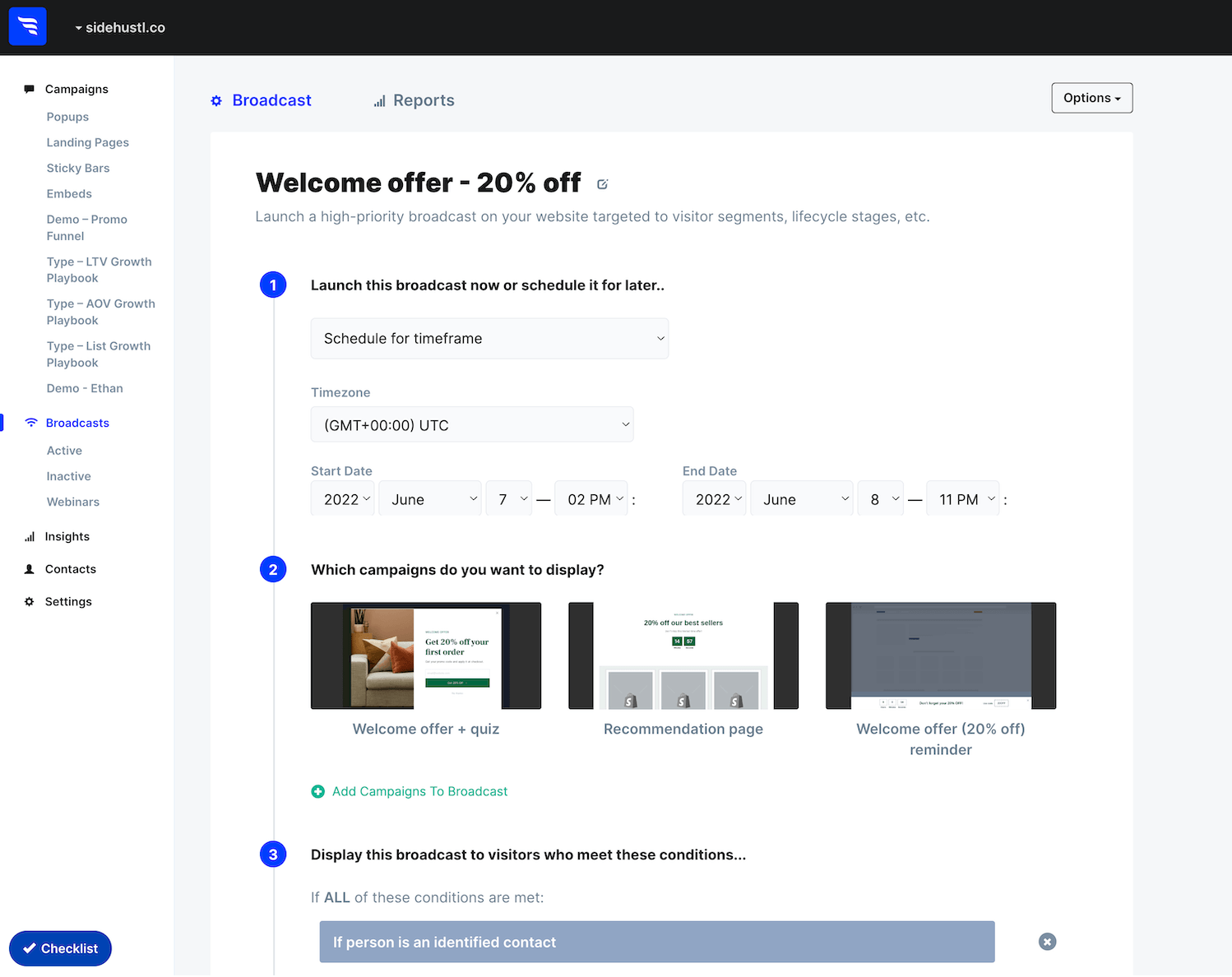
If you are looking for popup tools to improve lead qualification, ConvertFlow can be a great choice. By segmenting visitors based on their behavior, you can create polite “hook” CTAs that greet website visitors, collect their contact info, and segment them based on their behavior.
This way, you can focus on the leads that are most likely to convert.
I heard about the tool from different market leaders and found that it offers a range of features that make it easy to create popups. These targeted calls-to-action and progressive forms help capture the attention of website visitors.
ConvertFlow also offers a range of features that help you optimize conversion rates. It lets you create personalized landing pages and popups targeted to each lead’s interests.
Pros:
- A no-code builder to easily create personalized popups, forms, product recommendations, etc.
- Lets you create targeted calls-to-action that greet website visitors, collect their contact information, and segment them
- Offers high-converting overlays displayed based on time, page scroll, exit-intent, and click triggers
- Allows you to create beautiful multi-step CTAs that guide visitors through a series of questions
- Cart abandonment funnels that bring lost sales back by making compelling offers
Cons:
- A few users have reported that the user interface can be clunky and unresponsive at times
- The starter plan does not let you create popup campaigns or CTAs, which is kind of disappointing
Pricing: A free plan is available for up to 1,000 monthly views. Paid options start at $75/month.
G2 Rating: 4.5/5
Capterra Rating: 4.5/5
8. Sleeknote – Best for Gamified Popups
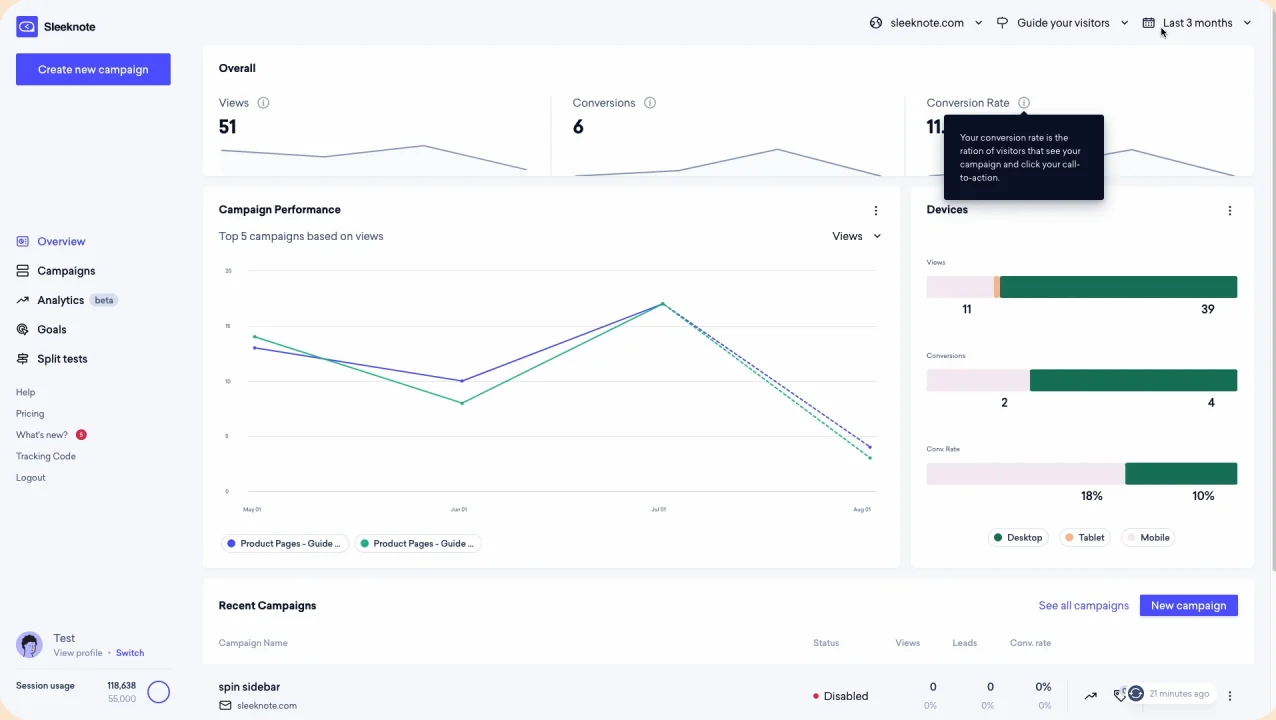
Gamified popups are a great way to engage and convert website visitors. They’re fun, interactive, and incredibly effective at getting people to take action.
I found Sleeknote to be a highly specialized tool for gamified popups. It’s easy to use, and with its drag-and-drop builder, I could create popups even without coding experience just by choosing a template and customizing it.
You can choose how to trigger the popups, such as exit-intent, scroll-based, or time-based. I also liked the ability to send targeted popups to specific audience segments.
Once your popup is live, Sleeknote will track its performance and provide you with detailed analytics. In my opinion, this is pretty useful to keep track of what’s working and what’s not!
Pros:
- Personalized targeting to reach the right people at the right time by setting up exit-intent triggers, geo-targeting, etc.
- Helps you grow your email list and segment subscribers effectively
- Interactive gamified elements such as spin-to-win wheels and scratchcards increase conversions
- Inline forms to collect leads directly from websites without disrupting the user experience
- Google Analytics integration to monitor your campaign performance
Cons:
- The broad range of features may result in a steep learning curve
- The lack of a free plan could be a limitation for small businesses or startups
Pricing: Starts at $49/month.
G2 Rating: 4.3/5
Capterra Rating: 4.8/5
9. Unbounce – Best for Optimizing High-Converting Landing Pages
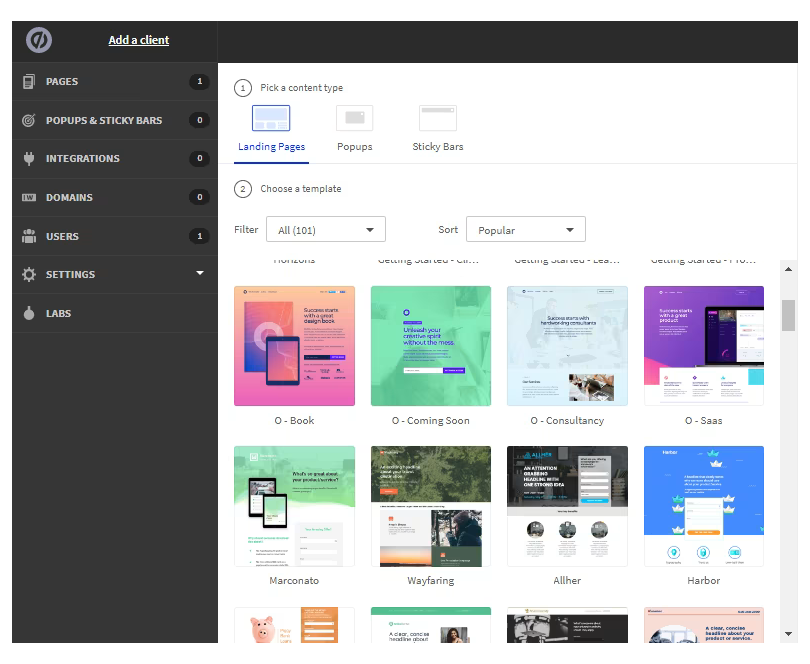
Unbounce is a versatile popup tool that goes beyond just creating stunning landing pages. It now offers an array of tools, including popups and sticky bars, designed to help you engage with website visitors and boost your conversions and leads quickly and effectively.
One of my favorite features of Unbounce is its collection of over 50 customizable popup templates. The extensive library allows users to effortlessly create and launch popup campaigns that align perfectly with their brand and messaging.
It also offers A/B testing, which simplifies the process of testing different versions of your popups by enabling you to divide your website traffic between these variations.
What makes Unbounce one of the best popup software is its comprehensive package, including both a landing page builder and a popup tool.
Pros:
- Highly intelligent conversion optimization tools for best results
- Personalized campaign options to tailor messages for your audience
- Intuitive drag-and-drop builder for effortless customization
- Robust A/B testing and advanced analytics for data-driven insights
- Laser-focused targeting options for precise engagement
Cons:
- It is limited to creating landing pages
- It may take some time and effort to master the tool and use it effectively
Pricing: Starts at $99/month.
G2 Rating: 4.4/5
Capterra Rating: 4.6/5
10. Thrive Leads – Best for Maximizing Lead Generation
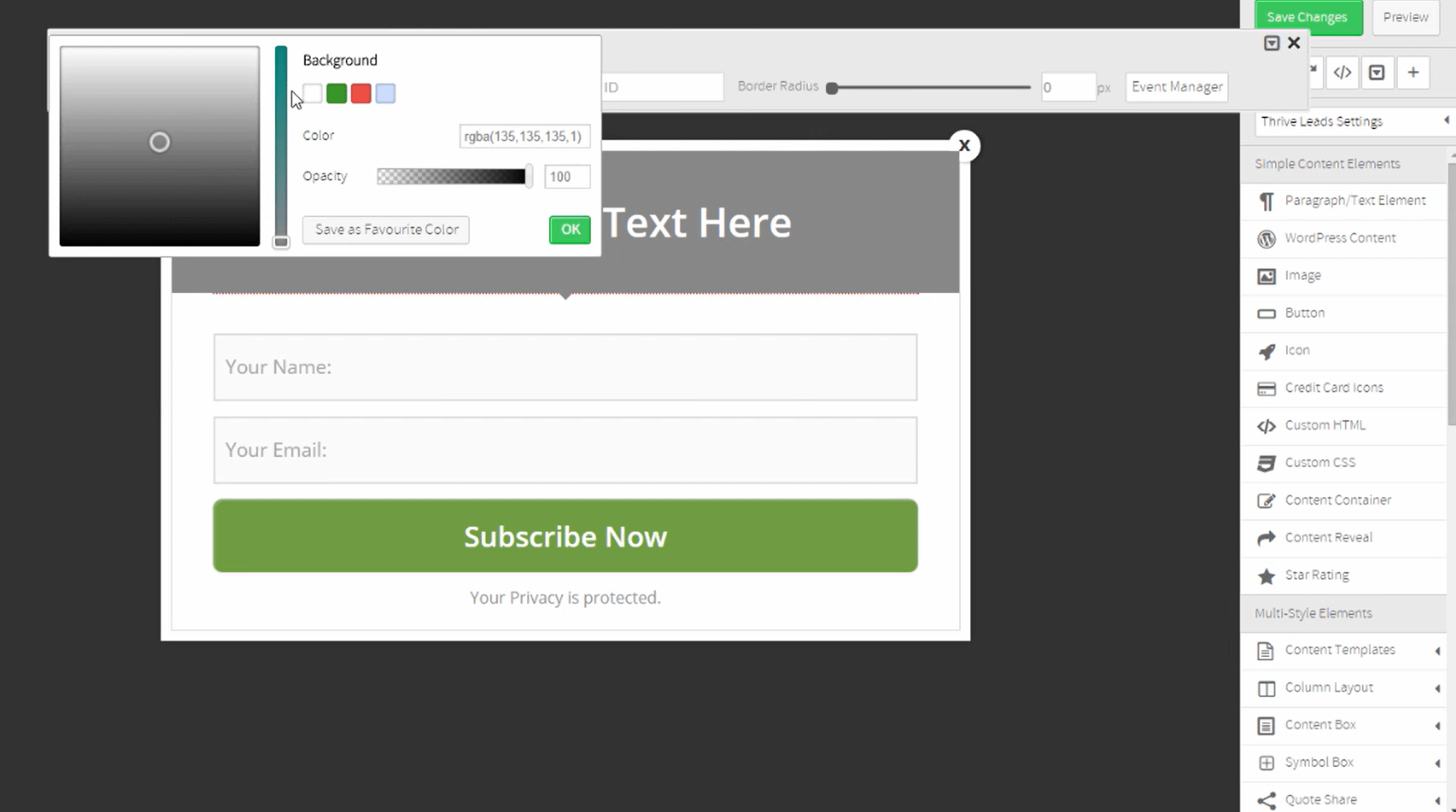
I feel Thrive Leads is one of the most user-friendly and straightforward website popup tools, making it an excellent choice for those seeking an easy-to-use solution.
Thrive Leads offers smart targeting capabilities that allow you to display different popups to your existing subscribers in a clever way.
It also has a wide variety of opt-in forms and popups, and the best part is that they’re fully responsive and load lightning-fast. That means you won’t have to worry about your website’s performance suffering due to slow-loading forms.
What I think sets this website popup tool apart is its robust reporting system that gives you detailed and actionable insights into how your opt-in forms are performing. It includes the conversion rates, impressions, and growth of your list for each form, group, or campaign, and more.
Thrive Leads is part of the Thrive Suite, which means you can access a range of web development tools, including a theme builder, a landing page builder, and quiz builder.
Pros:
- Highly intelligent targeting tools for precise engagement
- User-friendly drag-and-drop form builder for effortless customization
- An extensive array of templates to cater to diverse needs
- Complete responsiveness across devices for a seamless user experience
- A/B testing engine for effective optimization
- Actionable reporting and analytics to inform data-driven decisions
Cons:
- The reporting system is very slow and buggy
- Some of the templates look outdated or unprofessional
Price: Starts at $299/year.
G2 Rating: 4.5/5
Capterra Rating: 5/5
My Top 3 Popup Software Choices
Here are my top 3 picks for the best popup tools, each with unique strengths:
- Picreel: Top choice for lead generation with customizable popups, nanobars, and forms. Picreel offers advanced targeting, A/B testing, and a variety of templates to fit any brand.
- Unbounce: Known for creating engaging landing pages and popups, Unbounce provides a drag-and-drop builder, customizable templates, A/B testing, and detailed analytics for conversion optimization.
- Sleeknote: Ideal for non-intrusive popups, Sleeknote’s drag-and-drop editor and advanced targeting make it easy to design responsive, personalized popups.
Each tool brings unique features; choose based on your specific lead generation needs.
Evaluation Criteria
When I shortlisted the tools for this article, I didn’t just rely on feature lists or marketing pages. I followed a simple but structured evaluation process to make sure every recommendation is practical and fair.
Here are the six factors I focused on while reviewing the popup tools.
1. User Reviews & Ratings
One of the first things I look at is how real users feel about the product. Ratings and feedback on trusted platforms like G2 and Capterra often reveal things that product pages don’t mention.
For this article, I included verified ratings from both platforms for every tool. This gives you a quick sense of overall satisfaction and highlights any recurring issues users mention.
2. Essential Features & Functionality
Features matter, but only if they actually help you achieve the goal you’re using the tool for.
So instead of just listing features, I focused on the capabilities that make popup software effective, such as:
- Trigger types
- Targeting options
- Template variety
- Mobile performance
- Whether the tool genuinely solves the use case it claims to handle
This helped me understand which tools are practical in real scenarios, not just impressive on paper.
3. Ease of Use
Popup tools are meant to be quick conversion boosters, not complicated projects.
While evaluating each platform, I paid close attention to the interface, navigation, and overall setup experience. If launching your first popup takes more than 30 minutes, that friction adds up every time you want to create or adjust a campaign.
Tools that made campaign creation fast and intuitive naturally ranked higher in my list.
4. Customer Support
Even the best tools run into edge cases.
What matters is how quickly the support team responds and whether they actually help solve the issue. I looked at support availability, response times mentioned in user reviews, and how well teams assist during setup or troubleshooting.
If something breaks during a live campaign, responsive support can make a big difference.
5. Value for Money
Pricing pages can be misleading if you only look at the entry plan.
Instead, I evaluated value based on what you realistically get at the pricing tier most businesses would use. I also looked at how useful the free plans or trials are before you’re pushed into upgrading.
This helps answer the real question most people have: Is the tool worth the price you’ll actually pay?
6. Personal Experience & Expert Opinions
Finally, I factored in firsthand experience and insights from marketers who regularly run conversion campaigns.
If a tool consistently impressed experienced users or created frustration during real campaigns, that pattern shows up in the review. These practical observations help balance feature comparisons with real-world usability.
By combining user feedback, feature analysis, usability, support quality, pricing value, and real-world experience, I aimed to create a review that’s both practical and honest. This way, you can compare the tools with confidence and choose the one that fits your needs best.
How to Create a High-Converting Popup Campaign From Scratch?
Before building any popup, be clear about what you want it to do. Popups work best when they have one job: capture an email, present an offer, recover an abandoning visitor, or direct traffic to a specific page. Trying to do too many things at once dilutes the message and hurts performance.
Once you know your goal, a popup builder like Picreel lets you go from setup to live campaign without writing code or editing theme files. Here’s how the process works.
Here’s a simple guide to follow along.
Step 1: Install Your Popup Tool and Connect It to Your Site
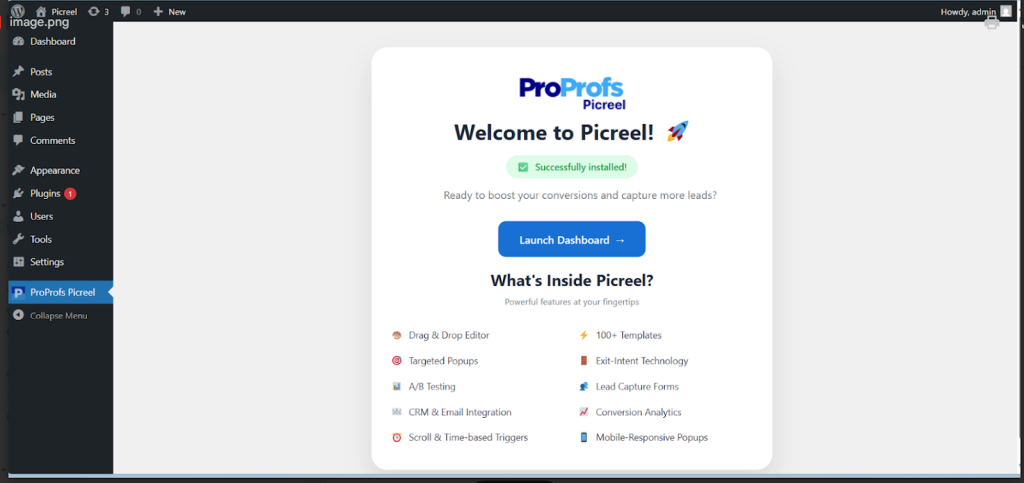
If you’re on WordPress, search for Picreel in the WordPress popup plugins directory, install and activate it, then log in or create your account.
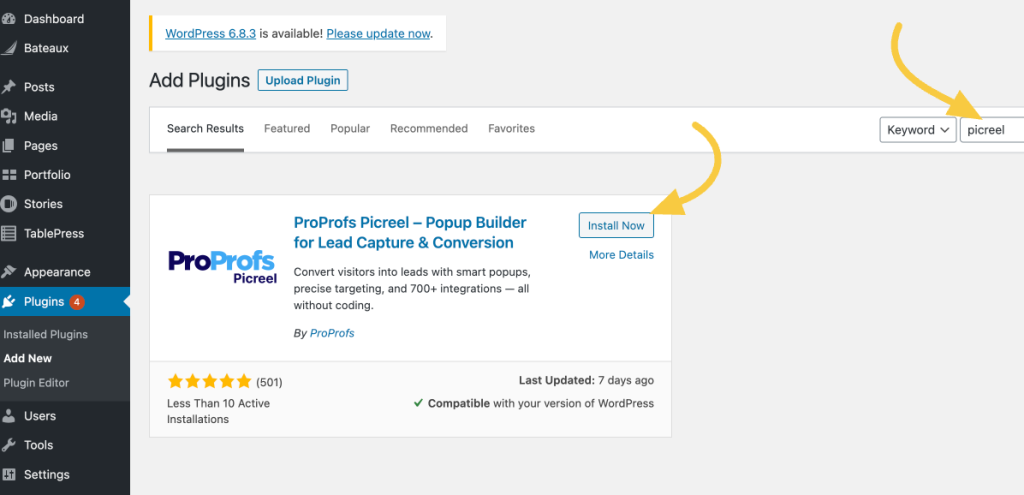
Once connected, your site syncs automatically.
Step 2: Create Your Popup Campaign
Open the Picreel dashboard and click Create Campaign.
You have two options depending on how hands-on you want to be.
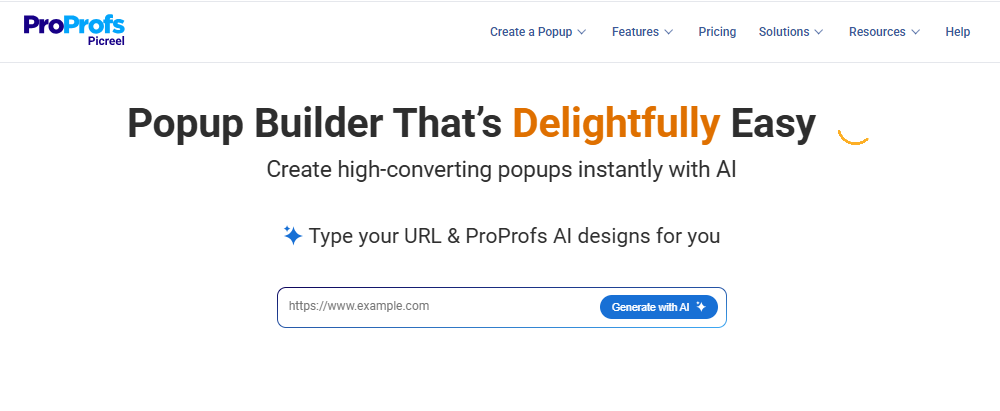
For faster setup, use Picreel AI. Enter your website URL, choose a goal such as lead capture, coupon offer, cart abandonment recovery, or announcement, answer a few short prompts, and Picreel generates a popup layout, copy, and CTA matched to your goal.
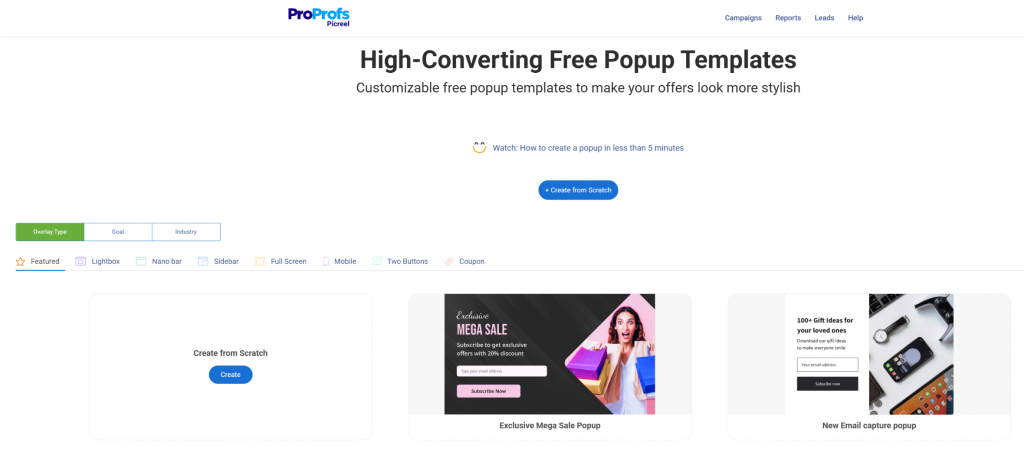
If you want full control, browse Picreel’s popup builder templates, organized by campaign type. Pick the template closest to your goal and customize from there.
Now, design your popup at this stage:
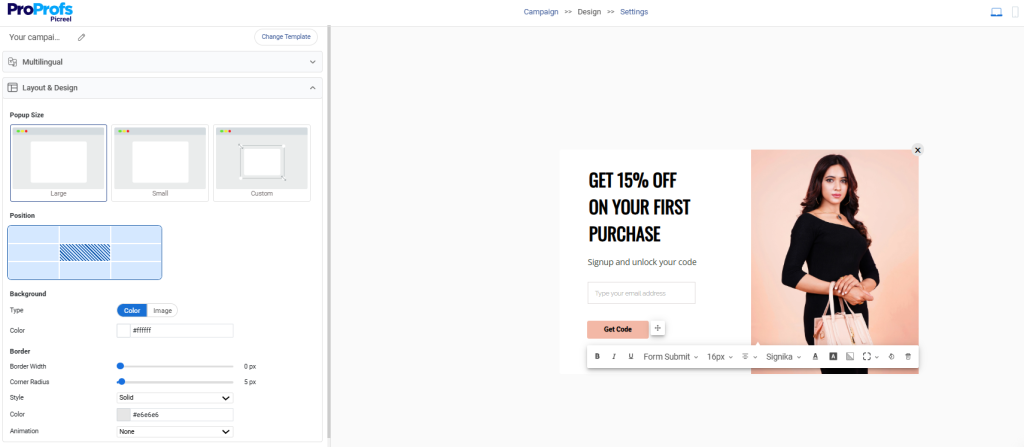
- Keep the form to one or two fields. Every additional field reduces submission rate.
- Make the CTA button text specific to the offer. “Get My 10% Off” converts better than “Submit.”
- Add a countdown timer if the offer is time-sensitive. They portray urgency and boost conversion rate by 112%.
- Use clean, minimal layouts that feel like part of your site rather than an interruption.
Step 3: Set Your Triggers and Targeting Rules
This is where popup campaign analytics start mattering, because trigger and targeting decisions determine who sees your popup, when, and under what conditions.
Choose your trigger based on intent:

- Exit intent for visitors about to leave, ideal for cart abandonment recovery and last-chance coupon offers
- Scroll depth for content readers who’ve shown genuine engagement with the page
- Time delay for visitors who’ve been on the page long enough to be interested but haven’t acted
- Click trigger for user-initiated popups that appear only when a visitor chooses to engage
- Set device targeting to “all devices” or choose a mobile-specific layout so your popup adjusts automatically across smartphones, desktops, and tablets. I am focusing on mobile experience because more than 61.5% of all internet traffic worldwide now uses mobile devices to explore websites.
Set your targeting rules:
- Show the popup only on specific URLs (for example, a coupon popup only on the cart page)
- Limit to new visitors, returning visitors, or specific geographic regions
- Exclude pages where the popup would feel out of place, like checkout confirmation pages
- Set frequency rules so visitors who’ve already seen or dismissed the popup don’t see it again on every page
Precisely targeting your audience can help you achieve an impressive conversion rate of 11%. A popup that fires on every page load regardless of context trains visitors to ignore it. A popup that appears once, at the right moment, on the right page, gets acted on.
Tip: Stay GDPR compliant by adding consent checkboxes and managing cookie-based targeting directly in Picreel’s settings.
Step 4: Preview, Test, and Publish
Preview the popup on both desktop and mobile before going live. Check placement, spacing, close behavior, and how it looks across different screen sizes.
Make sure:
- It doesn’t cover important content or navigation
- The close button is visible and easy to use
- The offer and CTA read clearly at a glance
- It loads without affecting page speed
Once everything looks right, publish the campaign. Picreel manages the technical side automatically, so you don’t need to adjust optimization settings after launch.
Step 5: Analyze Results and Run A/B Tests
Use Picreel’s Reports and Analytics dashboard to monitor views, clicks, and form completions from day one.
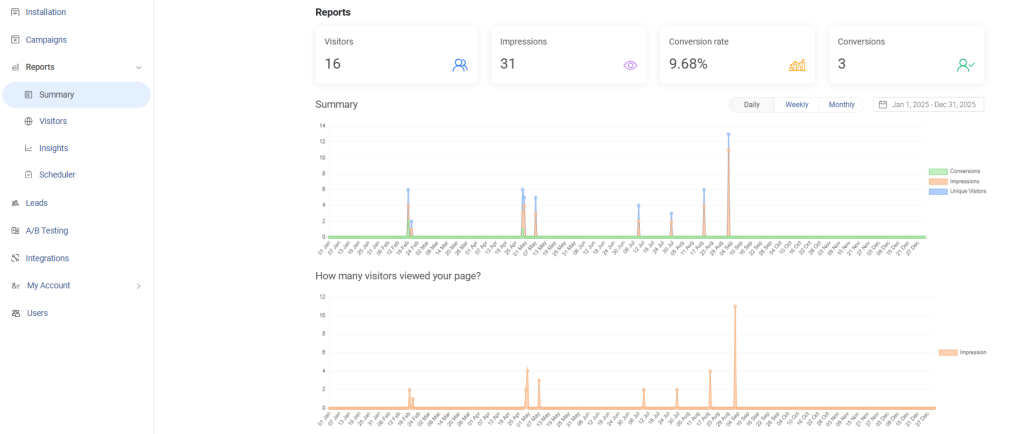
Once each popup variant gets a few hundred impressions, run A/B tests to improve performance. This is where popup strategy becomes data-driven instead of guesswork.
Start by testing the variables that influence conversions the most:

- Offer type: Compare a generic signup with a discount offer like “Get 10% Off.” Coupon offers often convert 2–3x higher in e-commerce.
- Trigger timing: Test time-delay vs. exit-intent. Exit intent usually performs 15–25% better because it reacts to user behavior.
- CTA copy: Replace vague buttons like “Subscribe Now” with benefit-focused ones like “Get My 10% Off.”
- Headline framing: Test informational headlines against benefit-led messaging.
Wait for at least 500 impressions per variant before choosing a winner, then apply the best-performing version to future campaigns.
FREE. All Features. FOREVER!
Try our Forever FREE account with all premium features!
Choose the Right Popup Software for Your Business & Boost Conversion
Imagine effortlessly turning website visitors into engaged subscribers and loyal customers. That’s the power of the right popups software.
But with so many options out there, how do you choose? It’s all about finding the perfect match for your needs. Match the tool to your traffic source and primary goal like email capture, cart recovery, or lead redirect and the right choice becomes clear.”
If you ask me, I’d recommend Picreel, as it stands out for its blend of advanced targeting, A/B testing, easy customization, and coupon popup support. It’s the practical default for small teams, multi-site operators, and anyone who wants to test popup campaigns before committing to a paid plan.
But the final choice depends on you. Pick a popup software that truly aligns with your goals to create a smoother, more enjoyable visitor experience while giving your marketing efforts a serious boost.
Frequently Asked Questions

How do coupon popups help reduce cart abandonment?
When a visitor with items in their cart moves to exit, a coupon popup fires with a discount or free shipping offer. This recovers 5 to 15% of abandoning sessions on average. Targeting the offer to the cart page URL specifically means it only reaches visitors who have already shown real purchase intent.
Does popup software integrate with Mailchimp and CRM tools?
Yes. Picreel connects with Mailchimp, Klaviyo, HubSpot, Salesforce, and 700+ other tools. Leads captured through an email capture popup flow straight into your list, tagged and ready for follow-up sequences, without manual exporting between platforms.
Do popup tools work on custom websites without plugins?
Yes. Tools that deploy via a JavaScript snippet work on any website regardless of CMS. Paste the code into your page template or add it through Google Tag Manager and it runs across every page. This works on custom builds, headless setups, and platforms that don't support plugin-based installs.
How does exit-intent popups software improve lead generation?
Exit-intent detects when a visitor's cursor moves toward closing the tab and fires a popup at that moment. You're reaching people who would otherwise leave with no interaction. Well-timed exit-intent popups recover 10 to 15% of abandoning visitors, making it one of the highest-ROI tactics on traffic you're already paying for.
Is popup software GDPR compliant?
Most reputable popup tools support GDPR compliance through built-in consent checkboxes and cookie-based targeting controls. You can customize these settings to match your regional requirements. Always verify what compliance features are included before running campaigns targeted at EU visitors.
Can popup software run across multiple websites from one account?
Yes. Picreel lets you manage campaigns across multiple domains from a single dashboard. This is practical for teams running several sites who want consistent lead capture logic without rebuilding campaign setups from scratch for each domain.
FREE. All Features. FOREVER!
Try our Forever FREE account with all premium features!

 We'd love your feedback!
What did you like & how can we make it even better?
 Thanks for your feedback!
 Ask Your Question
Have a question? Get expert help to make your decision easier.