
If you are running a Shopify store, you already know the frustration. Traffic comes in, people browse, and then they leave. Your analytics shows the drop-off, but gives you zero context about why it happened.
According to the Baymard Institute Cart Abandonment Rate Research in 2025, the average cart abandonment rate is 70.19%, highlighting how much revenue is lost without understanding user intent.
Was the price wrong? Did they not trust the brand? Were they just not ready? You are left guessing, and every optimization you run is essentially a shot in the dark.
That is the gap Shopify survey apps are built to close. Instead of interpreting behavior after the fact, you ask the visitor directly at the right moment in their journey. The answers tell you exactly what to fix, what to offer, and how to follow up in a way that actually converts.
I tested 10 of these tools so you do not have to. Here is what actually works.
What Is a Shopify Survey App & Why It Matters for Revenue Growth
A Shopify survey app is a tool that helps you collect direct feedback, preferences, and intent from your store visitors through on-site surveys, popups, or quizzes. Unlike traditional analytics that only show what users do, these apps help you understand why they behave a certain way.
Here is what the right survey app actually helps you do:
- Cart recovery: Catch abandoning visitors with a single exit-intent question, learn why they are leaving, and offer the right incentive in the same session to bring them back.
- Attribution clarity: Ask “How did you first hear about us?” on the thank-you page and surface channels your pixel-based analytics. Consistently misses, particularly podcasts, word-of-mouth, and organic social.
- Zero-party data: Collect preferences, skin types, budgets, and goals directly from visitors through quizzes and forms. Use that data to personalize email sequences without relying on third-party tracking.
- Checkout optimization: Place a single question at checkout to understand what almost stopped the purchase. Use those answers to fix product page objections and improve future ad copy.
- Lead generation: Turn passive browsers into leads by pairing a short survey with a discount offer or a product recommendation, creating a value exchange that motivates action.
10 Best Shopify Survey Apps
Here are the 10 best Shopify survey apps I evaluated, covering everything from exit-intent popups to post-purchase attribution to zero-party data collection. Before jumping into the list, here is a quick comparison to help you scan at a glance.
| Tool | Best For | Starting Price | Rating |
|---|---|---|---|
| Picreel | Exit-intent surveys + lead capture | $9.99/month | 4.5/5 (G2) |
| ProProfs Survey Maker | Dedicated survey builder | Free plan available, paid starts $19.99/mo | 4.3/5 (G2) |
| Claspo | No-code on-site surveys | $29/mo | 4.9/5 (G2) |
| Customer.guru | NPS tracking | $50/mo | 4.6/5 (G2) |
| Grapevine | Post-purchase for small stores | $25/mo | 3/5 (G2) |
| Fairing (Enquire) | Post-purchase attribution | $49/mo | 4.9/5 (G2) |
| Zigpoll | Flexible placement surveys | $29/mo | 4.3/5 (G2) |
| POWR Survey | Conditional logic forms | $8.79/mo | 4.4/5 (G2) |
| Post Purchase Surveys (HulkApps) | NPS + one-click setup | $25/mo | 4.8/5 (Shopify) |
| Neowauk | Email + discount survey popups | $10.95/mo | 4.7/5 (Shopify) |
1. Picreel – Best for Exit-Intent Surveys and Lead Capture
I first heard about Picreel from a colleague who runs a DTC supplements brand, and her experience piqued my curiosity. What really stood out to her, and later to me, was how quickly you can get started. The AI popup builder generates campaign ideas, copy, and layouts just by entering your store URL, which makes testing different surveys incredibly fast without needing design or coding skills.
Once I started using it, the exit-intent targeting was what impressed me the most. It goes beyond basic cursor tracking and actually looks at scroll behavior, time on page, and browsing patterns to predict when a visitor is about to leave. I set up a simple “What stopped you from checking out today?” survey on my product pages, and the response rate was noticeably higher than the forms I had tried before.
I also liked how easy it was to personalize campaigns based on visitor behavior and traffic source. The analytics dashboard helped me understand what was working and refine my surveys over time. Overall, it felt less like a popup tool and more like a way to actually understand and recover lost conversions.
Pros:
- AI popup builder generates the popup copy and layout from your store URL in under a minute.
- AI-powered exit intent reads behavioral signals, not just cursor movement, for earlier and more accurate trigger timing
- A/B testing is built into every campaign with real-time data, so you can iterate without leaving the dashboard
- Dynamic content options for personalized surveys.
Cons:
- No downloadable or on-premise version, which is a blocker for stores with strict data hosting requirements
- Dark mode option is not available for popup designs
Pricing: Offers a forever-free plan for up to 5K visitors (For WordPress, you may need the Enterprise account). Paid plans start at $9.99/month.
G2 Rating: 4.5/5
Capterra Rating: 4.9/5
2. ProProfs Survey Maker – Best Dedicated Survey Builder for Shopify
This tool lets me ask follow-ups, dig a little deeper, and actually understand what customers were thinking after a purchase. This tool made that pretty easy. I just entered my survey topic, and the AI gave me a solid starting set of questions. I tweaked a few, adjusted the design to match the store, and it was ready to go faster than I expected.
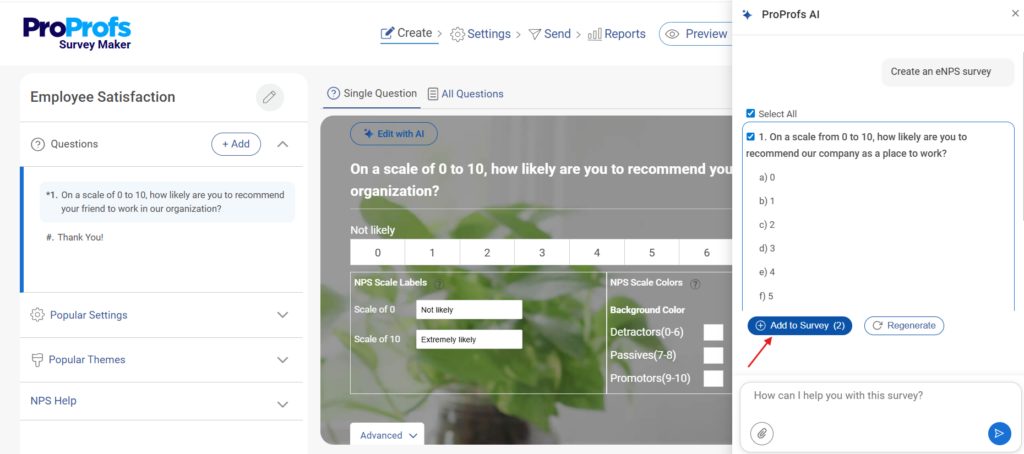
One thing that stood out while using it was how naturally the survey could evolve based on answers. If someone rated their experience low, I could ask a different follow-up than someone who rated it high. That small change made the responses way more useful. I also liked that I didn’t have to spend time analyzing everything manually. The tool highlighted patterns for me, so I could quickly spot what needed fixing.
Pros:
- Branching logic and automatic scoring built into the question builder for structured multi-question surveys
- Sidebar survey format collects feedback without blocking content or interrupting the shopping flow
- Customizable branding and themes so the survey matches your store’s visual identity without a designer
Cons:
- Interface feels dated compared to newer popup-first tools, which can slow down first-time setup
- Free version displays ads to respondents, which affects the experience for anyone filling out your survey
Pricing: Starts at $19.99/month
G2 Rating: 4.3/5
3. Claspo – Best No-Code On-Site Survey Builder
A friend who runs marketing for a growing homeware brand switched to Claspo to do the survey stuff without touching the code. Its drag-and-drop editor let her build an exit-intent email capture survey with behavior-based targeting in about 15 minutes without touching a single line of code.
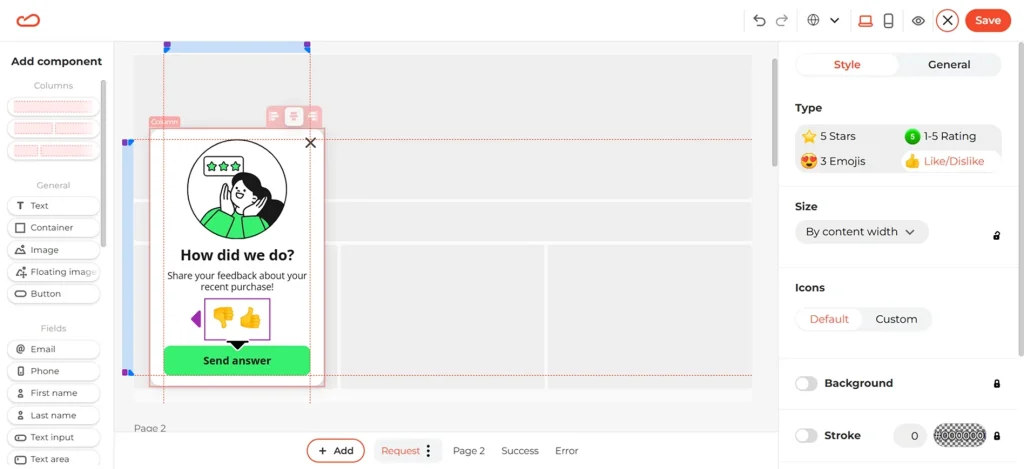
What impressed her most was the targeting granularity. She could layer referral source, device type, scroll depth, and traffic channel simultaneously to show different surveys to different visitor segments.
The built-in A/B testing meant she could iterate on question wording without digging through settings menus, and the lightweight setup never slowed down page load speed, which had been a recurring problem with her previous tool.
Pros:
- No-code visual builder with targeting options that go well beyond what most tools offer at this price point
- Built-in A/B testing lets you test question wording and designs without a separate experimentation tool
- Lightweight script that does not slow down Shopify store performance even when running multiple campaigns
Cons:
- You’ll need to connect it with your email or marketing tools if you want to act on responses, since it doesn’t handle follow-up campaigns on its own
- Deeper workflow automation (like syncing actions across tools) may require integrations like Zapier
Pricing: Start at $29/month
G2 Rating: 4.9/5
4. Customer.guru – Best for NPS Tracking Across Your Customer Base
Customer.guru is the most focused tool on this list. It does one thing, net promoter score tracking, and it does it exceptionally well.
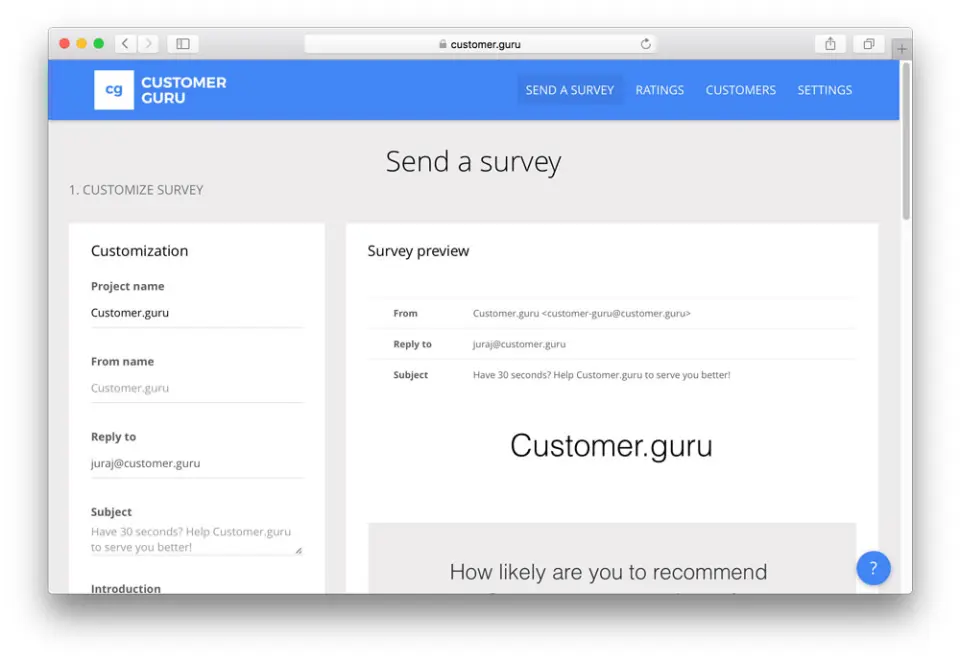
When I set it up for a client running a repeat-purchase Shopify store, the depth of the reporting immediately stood out. Each NPS response was tagged with geographic location, order history, purchase date, and products purchased, allowing us to identify exactly which customer segments were most loyal and which were quietly at risk of churning.
The app integrations mean the NPS data does not sit in a silo. You can push it into your CRM, segment it in your email platform, and build automated re-engagement flows around low scores without any manual work.
Pros:
- NPS surveys can be created and sent in under five minutes with their streamlined setup
- Detailed reporting includes geographic, behavioral, and purchase data alongside scores
- Smart follow-up logic adjusts the survey flow based on respondent scores
Cons:
- The interface can feel a bit clunky, especially if you’re expecting a modern, intuitive experience
- Customer support response times have been flagged in several reviews as inconsistent
Pricing: Starts at $50/month.
G2 Rating: 4.6/5
5. Grapevine Post-Purchase Survey – Best for Budget-Conscious Small Stores
Grapevine is the most accessible post-purchase survey tool on this list, and for small Shopify stores that primarily need attribution data and basic customer feedback, it delivers everything you actually need.
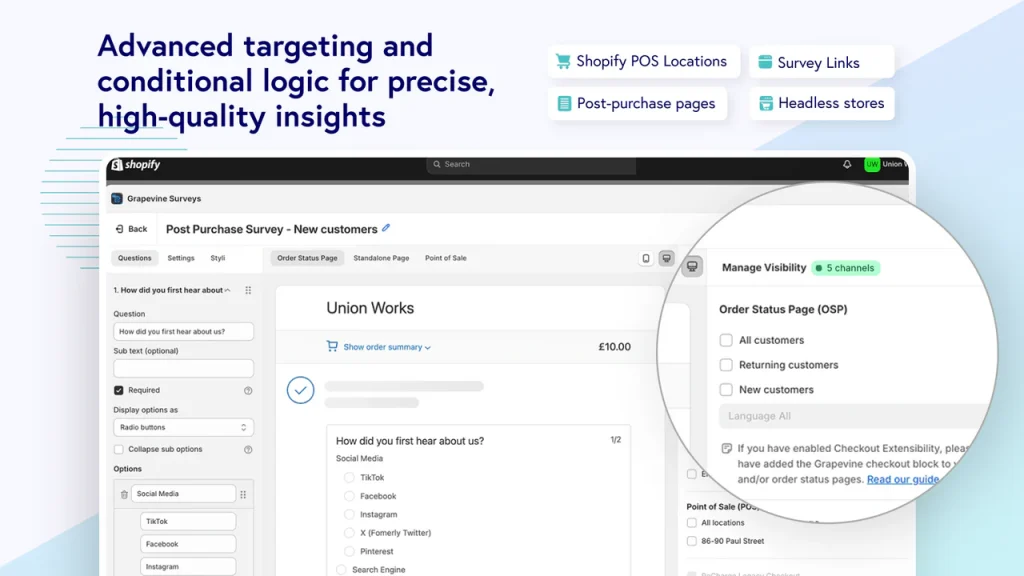
I recommended it to a DTC skincare brand that had been spending on an enterprise survey tool they were using at about 10% of its capacity. They switched to Grapevine, deployed a four-question post-purchase survey on their thank-you page within an hour, and had cleaner attribution data within two weeks.
The survey revenue analysis feature is a genuinely smart addition for a tool at this price point. It connects survey responses to purchase data so you can see which answers correlate with higher order values and repeat purchases.
Pros:
- Simple, intuitive interface that’s easy to get started with
- Seamless integration with Shopify’s thank-you and order confirmation pages
- Survey revenue analysis connects feedback to purchase behavior directly
Cons:
- Customization requires CSS knowledge, which is a barrier if you do not have a developer available
- No exit-intent or on-site survey capability, it only works in the post-purchase placement
Pricing: Starts at $25/month
G2 Rating: 3/5
6. Fairing (Enquire) – Best for Post-Purchase Attribution
I started noticing Fairing, formerly Enquire Labs, being recommended a lot in Shopify circles, especially when it comes to attribution. After using it, I understood why. It handles the classic “How did you hear about us?” question far better than most tools I’ve tried.
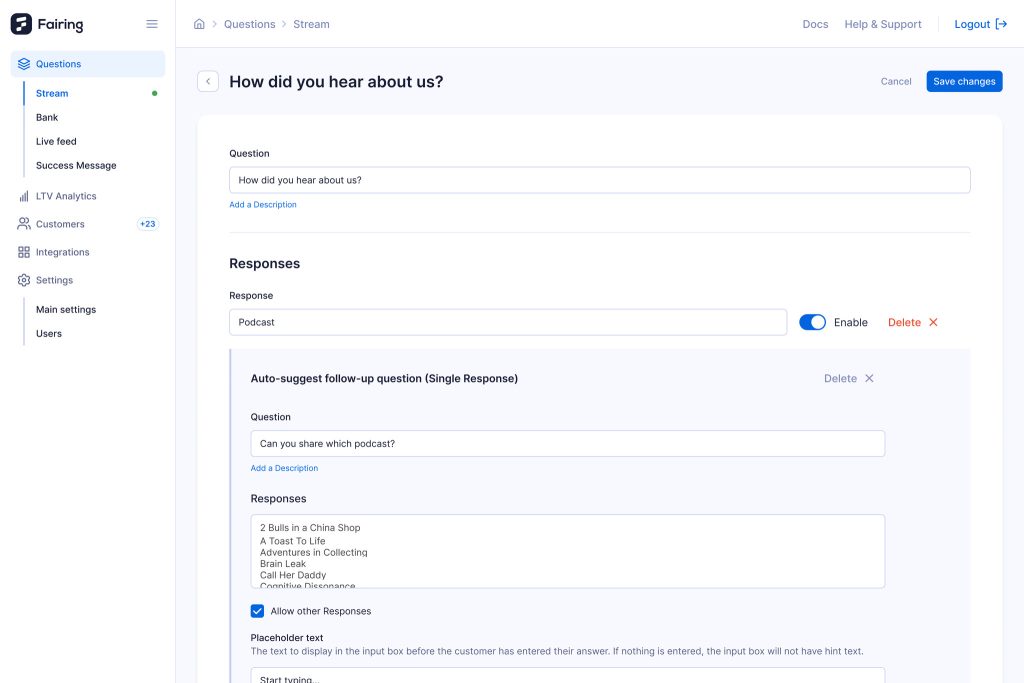
Instead of relying only on pixel data, it captures answers directly from customers, which gives a much clearer picture of where conversions are actually coming from.
What stood out to me was how different the insights felt compared to standard analytics. I’ve seen cases where the channels getting credit in dashboards weren’t the ones customers actually mentioned. That kind of data can really change how you allocate your marketing budget.
Pros::
- People-powered attribution surfaces channels that pixel-based models Cons:istently miss, including podcast ads and word-of-mouth
- Native Shopify and Shopify Plus integration with direct connection to Klaviyo and Triple Whale
- Question stream feature enables programmatic follow-up surveys after the initial post-purchase response
Cons:
- Lacks advanced filtering options, especially purchase-based filtering
- Klaviyo integration can feel restrictive due to limited custom property formatting
Pricing: Starts at $49/month
G2 Rating: 4.9/5
7. Zigpoll – Best for Flexible Survey Placement Across the Store
I find Zigpoll useful for handling surveys across different touchpoints without adding more tools to the stack. I liked how I could place surveys on product pages, checkout, thank-you pages, and even across email and SMS, all managed from one place.
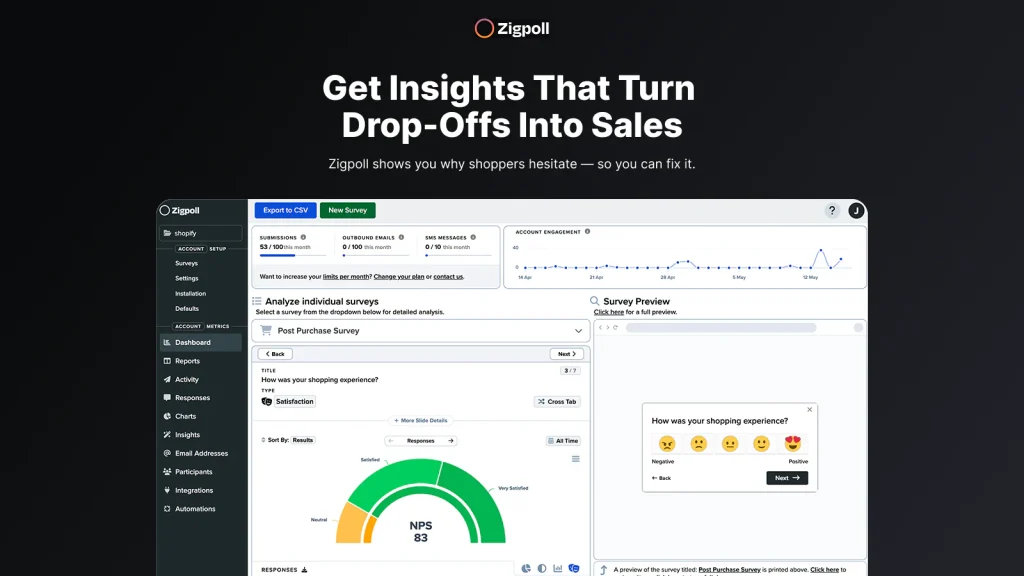
The ability to embed short polls directly into product pages, without interrupting the experience with a popup, was especially useful and not something I’ve seen often at this price point.
Another feature that worked well for me was the gamification element. Offering a small discount or giveaway in exchange for completing a survey noticeably increased response rates. It also gave us a nice boost in conversions, which is not something most survey tools manage to combine so effectively.
Pros:
- Embed surveys at any touchpoint: product pages, checkout, thank-you pages, email, and SMS from one dashboard
- Shopify Flow integration automates follow-up actions based on individual survey responses
- Reward-based surveys that offer discounts to respondents improve completion rates and drive conversions simultaneously
Cons:
- Some users report that the answer input interface needs improvement for complex open-ended questions
- Advanced features require jumping to higher-tier plans that may not suit small stores
Pricing: Starts at $29/month
G2 Rating: 4.3/5
8. POWR Survey and Feedback Forms – Best for Conditional Logic and Form Flexibility
POWR’s survey tool is the one I recommend when a team needs forms that behave intelligently based on how visitors respond. The conditional questioning feature, which shows or hides follow-up questions based on previous answers, creates a personalized survey experience that feels more like a conversation than a form.
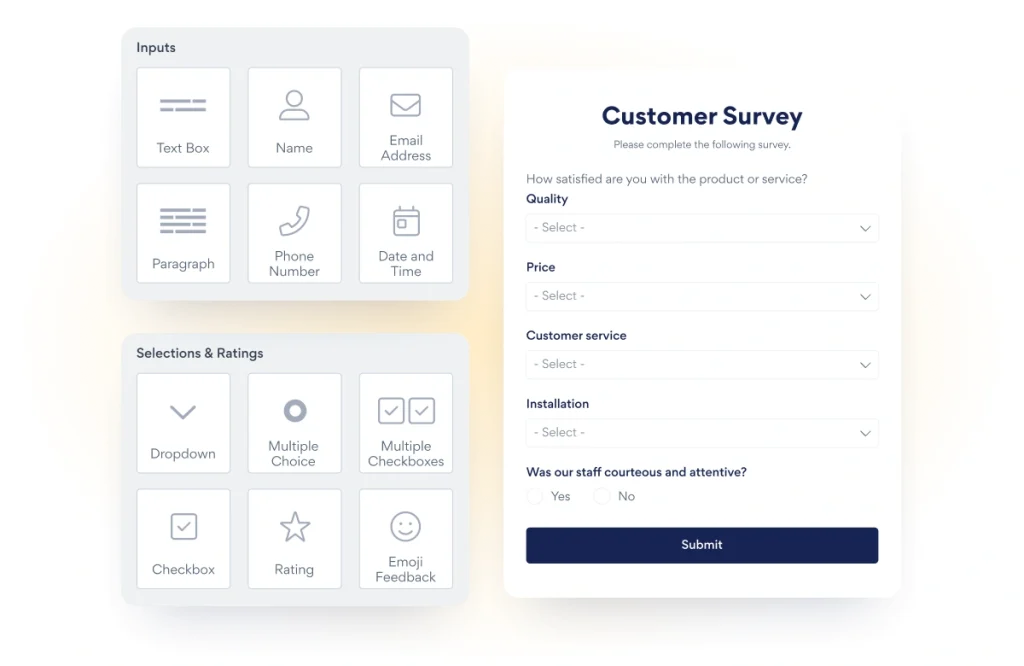
I used it for a store running a skincare quiz that needed to route visitors to different product recommendations based on their skin type, concerns, and budget. The setup was entirely no-code, and the resulting form looked polished enough that visitors engaged with it as part of the shopping experience.
The post-submission configuration is also more flexible than most tools at this tier, letting you redirect users to custom pages, show results, or display tailored offers based on what they answered.
Pros:
- Conditional logic shows or hides questions based on previous answers for a personalized, conversation-style experience
- Post-submission redirect and configuration options let you route respondents to custom pages or offers based on their answers
- Rich form elements, including star ratings, emoji feedback, picture choices, and dropdowns for creative survey design
Cons:
- Customization and flexibility may be restricted, especially for advanced survey design or complex workflows
- Integration options are narrower than competitors, particularly for newer marketing and automation platforms
Pricing: Starts at $8.79 /month
G2 Rating: 4.4/5
9. Post Purchase Surveys by HulkApps – Best for Quick NPS Setup on Shopify
A friend of mine had been putting off adding any kind of survey system because every option she explored felt like a multi-week setup. When she tried Post Purchase Surveys by HulkApps, that hesitation disappeared pretty quickly. It was one of those rare tools that actually worked right out of the box.
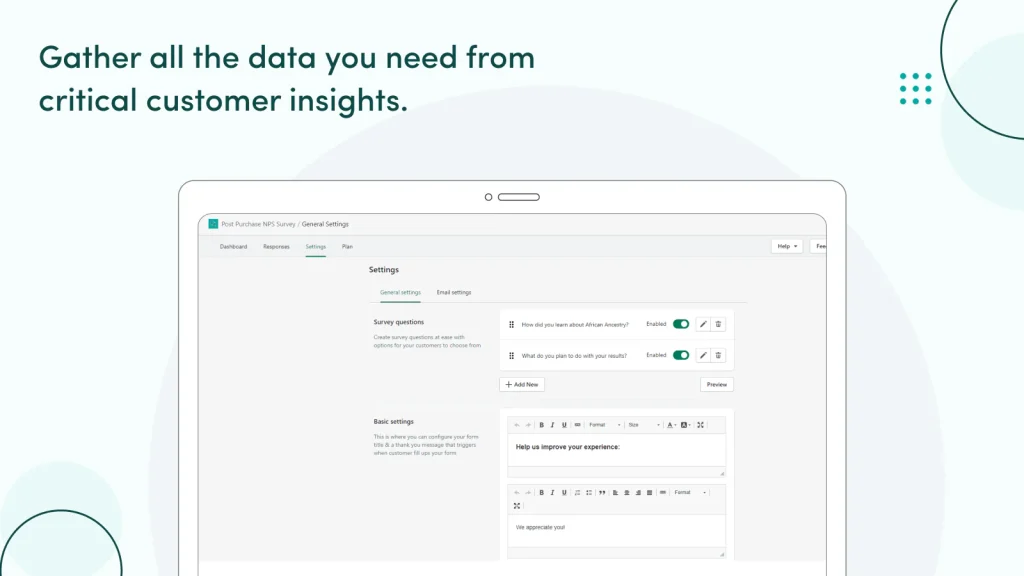
She installed it with a single click on the Shopify order confirmation page, used the built-in NPS template, and was up and running in under an hour. No complicated setup, no back-and-forth with developers.
What really stood out to her was the analytics. The dashboard didn’t just show scores, it connected responses directly to the products customers had purchased. Within a few days, she noticed that buyers of a specific product line were Cons:istently giving lower ratings. That insight helped her catch a quality issue much earlier than she otherwise would have.
Pros:
- One-click installation onto the Shopify order confirmation page with no manual configuration required
- Response analytics show NPS data alongside customer order information for product-level satisfaction analysis
- Customers respond immediately post-purchase at the moment engagement and goodwill are at their peak
Cons:
- Survey customization options are limited, making it difficult to build anything beyond a standard NPS or single-question format
- The analytics dashboard is fairly basic and does not support advanced segmentation or cohort-level filtering
Pricing: Starts at $25/month
Shopify Rating: 4.8/5
10. Neowauk – Best for Combining Email Capture, Surveys, and Discount Campaigns
A colleague I know was dealing with a Cons:tant coupon-sharing issue for a fashion brand she manages. They would run popup campaigns with discount codes, and within hours those codes would end up on deal sites, cutting into margins without really improving customer loyalty.
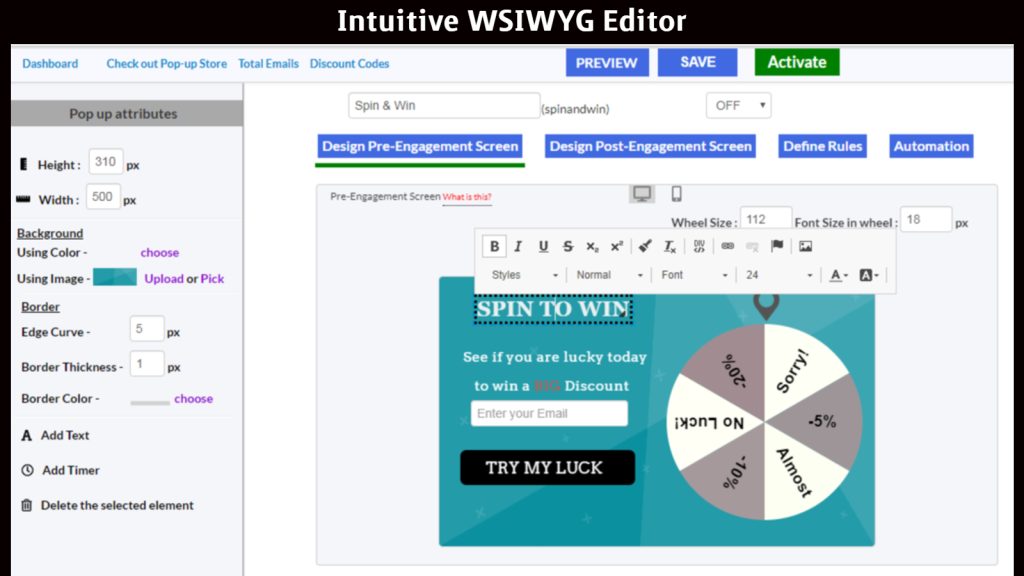
She told me Neowauk handled this in a way that actually fixed the problem. Instead of showing the same code to everyone, it generates a unique coupon for each person who completes the survey. That small change made a big difference. The discounts stayed personal, attribution became much clearer, and the whole coupon-leak issue just stopped.
Another thing she mentioned was the email reminder feature. If someone completed the survey but didn’t use the code right away, the system would follow up automatically. It helped them recover those almost-customers without spending more on ads, which made the whole campaign feel much more efficient.
Pros:
- Unique coupon code per respondent eliminates sharing and gives you clean attribution between survey completion and purchase
- Email reminders for unused discount codes recover visitors who engaged but did not convert in the same session
- No Neowauk branding on popup widgets even on lower-tier plans, which keeps the experience on-brand
Cons:
- The tool works best as a discount-survey hybrid and lacks the depth needed for complex, multi-step survey workflows
- Daily visitor cap on all plans means very high-traffic stores may hit limits during peak sale periods
Pricing: Starts at $10.95/month
Shopify Rating: 4.7/5
Evaluation Criteria
Feature pages and vendor marketing tell you what a tool claims to do. They rarely show how it performs when real visitors interact with it under real traffic conditions. So instead of relying on claims, I tested each tool using a clear framework.
- Essential features and functionality: A tool is only as good as what it actually helps you do. I looked closely at how well each platform handles core capabilities like targeting, automation, integrations, and reporting. Tools that delivered consistent, practical value in real workflows ranked higher than those with long feature lists but limited execution.
- Ease of use: Even powerful tools fail if they are hard to use. I evaluated how intuitive each platform feels during setup and daily use, including navigation, interface clarity, and learning curve. Tools that allowed quick deployment without technical friction stood out.
- Trigger quality: Most tools say they offer exit-intent detection. I focused on how accurately and how early they detect real abandonment signals. Tools that analyze scroll patterns, browsing behavior, and time on page ranked higher than those relying only on cursor movement. On mobile, where there is no cursor, this difference matters even more.
- Integration depth: A long list of integrations means little if data does not flow properly. I checked whether survey responses trigger actions in real time or just sit in a dashboard. Tools that sync cleanly with platforms like Klaviyo without manual exports scored higher.
- Mobile performance: Most Shopify traffic comes from mobile. I tested each tool on Android and iOS to see if surveys load properly, look clean, and actually convert.
- Customer support: I looked at how responsive and helpful each platform’s support team is across different stages, from initial setup to troubleshooting. Tools with strong documentation, fast response times, and reliable issue resolution scored better.
- Value for money: I evaluated pricing against real usage scenarios, especially for stores with 5,000 to 50,000 monthly sessions. I also checked whether free plans are genuinely usable or just limited previews. The goal was to identify tools that deliver strong performance without hidden costs.
- User reviews and ratings: Instead of focusing only on star ratings, I analyzed patterns across trusted software review platforms like G2 and Capterra. Repeated feedback, both positive and negative, helped identify consistent strengths and real limitations that may not appear in marketing materials.
- Personal experience and expert insights: Finally, I combined hands-on testing with insights from industry experts and real user feedback. This helped validate what works in practice, not just in theory, and ensured the recommendations reflect actual performance in real marketing environments.
How Shopify Brands Use Survey Apps to Recover Carts and Grow Revenue
Most Shopify brands treat surveys as a reporting tool. The brand’s growing revenue has led it to treat surveys as a trigger system.
The difference is whether the data you collect connects to an automated action or just sits in a dashboard.
Here is how the most effective use cases actually work, with the questions and actions that make them work in practice.
| When It Fires | Question to Ask | What to Do With the Answer | |
|---|---|---|---|
| Exit intent recovery | Visitor moves to close the browser tab or rapidly scrolls up on mobile | "What stopped you from checking out today?" with options: Price, Shipping cost, Not sure yet, Just browsing | If "Price" or "Shipping": fire a discount or free shipping offer in the same popup. If "Not sure yet": redirect to a review page or bestseller list |
| Post-purchase attribution | Immediately after the order confirmation page loads | "How did you first hear about us?" with options: Google, Instagram, TikTok, Podcast, Friend/Family, Other | Tag the response in Klaviyo against the order. After 90 days, compare which channels your customers mention versus what your pixel credits. Shift budget accordingly |
| Product recommendation quiz | Visitor lands on a category or collection page | "What are you shopping for today?" followed by 3 to 4 preference questions | Return a personalized product recommendation with a direct add-to-cart button. Capture email before showing results for lead generation |
| Checkout intent survey | During the checkout process above or below the payment form | "Is there anything that almost stopped you from completing this order?" | Compile answers weekly. Top answers reveal product page gaps, trust issues, and shipping objections. Use findings to rewrite product descriptions and FAQs |
| Post-purchase satisfaction | 7 to 14 days after delivery via email | "How would you rate your experience with [product name]? What could we have done better?" | Route detractor responses to a customer service workflow immediately. Route promoter responses to a review request sequence |
| Win-back survey | Lapsed customer who has not purchased in 90-plus days, triggered via email | "We miss you. What would bring you back?" with options: Better prices, New products, Forgot about you, Found another brand | Use answers to segment the win-back campaign: price-sensitive customers get a discount, product seekers get a new arrivals email, and disengaged customers get a brand story email |
FREE. All Features. FOREVER!
Try our Forever FREE account with all premium features!
Turn Shopify Surveys Into Consistent Conversion Revenue Wins
Shopify survey apps aren’t just feedback tools—they’re conversion levers. The biggest takeaway is this: data only matters if it triggers action. Whether it’s recovering abandoned visitors, uncovering true attribution, or collecting zero-party data, the right survey setup helps you turn insights into immediate revenue impact.
Keep your surveys short, tie every answer to a clear follow-up, and focus on high-intent moments like exit intent or post-purchase.
If you’re just starting out, Picreel is a solid pick because it combines fast setup, smart targeting, and built-in optimization without complexity.
Next step? Pick one use case (like cart recovery), launch a single-question survey, and track what responses actually change your conversions. Then iterate from there.
Frequently Asked Questions

What is zero-party data and why does it matter for Shopify stores?
Zero-party data is information customers willingly share through surveys, quizzes, or forms. Unlike third-party tracking, it is accurate, privacy-compliant, and cookie-independent. As third-party tracking erodes across browsers and platforms, zero-party data collected through surveys is becoming the most reliable foundation for personalized marketing.
How many questions should a Shopify survey have?
Exit-intent surveys work best with one question. Post-purchase surveys can support three to five questions because customers are cooperative immediately after buying. Product quizzes can run slightly longer because visitors expect a recommendation in return. Anything beyond five questions on a popup significantly drops completion rates.
Can Shopify survey apps integrate with Klaviyo and Mailchimp?
Most tools on this list integrate natively with both. Confirm the integration is available on your specific pricing tier before committing, since some tools reserve it for higher plans.
Are there free Shopify survey apps that genuinely work?
Yes. Picreel's free plan supports unlimited campaigns for up to 5,000 monthly visitors. Check whether the free plan includes the specific trigger and integration you need before testing.
How do I use survey data to personalize email marketing?
Connect your survey tool to Klaviyo or Mailchimp and use responses as segmentation criteria. A post-purchase survey answer like "primary skin concern: dryness" should automatically tag the customer and route them into the appropriate product recommendation sequence. The goal is automated routing, not manual exports.
How do I measure whether my Shopify survey is improving conversions?
Match the measurement to the goal. For exit-intent surveys paired with an offer, compare conversion rates of visitors who saw the survey against those who did not. For attribution surveys, track whether media mix changes informed by the data correlate with lower cost per acquisition over 60 to 90 days.
What is the difference between an exit intent survey and a post-purchase survey?
An exit-intent survey fires when a visitor is about to leave without buying. Its goal is to understand abandonment and recover the visitor in the current session. A post-purchase survey fires on the order confirmation page after a purchase. Its goal is attribution, satisfaction data, and lead enrichment from customers at peak engagement.
FREE. All Features. FOREVER!
Try our Forever FREE account with all premium features!

 We'd love your feedback!
What did you like & how can we make it even better?
 Thanks for your feedback!
 Ask Your Question
Have a question? Get expert help to make your decision easier.