
A few months ago, a friend who runs a fast-growing eLearning startup told me about his biggest frustration — great traffic, but low engagement. People were visiting his site, checking out the courses, and leaving without interacting. He needed to know why. That’s when he decided to try a WordPress Popup Survey.
Within days, he started receiving honest feedback from real users — what confused them, what they expected, and what made them hesitate. Those small insights led to big improvements, from refining course descriptions to optimizing pricing pages.
The result? Conversions jumped by double digits. And this lines up with broader data too, since popup surveys often convert at around 11% on average, with top performers going well past 40%
I’ve seen stories like this play out time and again. Feedback is often the missing link between traffic and growth. That’s why I’ll show you how to create a WordPress popup survey step by step — the same strategy entrepreneurs in my network use to turn casual visitors into loyal, engaged customers.
What Is a WordPress Popup Survey Plugin?
A WordPress Popup Survey Plugin is a tool that allows you to collect feedback or leads directly from your website visitors through on-screen popups. Instead of redirecting users to a separate page, it displays a small survey window, often triggered by user actions like scrolling, time spent, or exit intent.
These plugins let you customize questions, design layouts, and choose when and where the popup appears.
For example, you might ask visitors why they’re leaving your pricing page or what kind of content they’d like to see more of. Many plugins also integrate with CRMs, email platforms, and analytics tools, making it easy to automate follow-ups and measure engagement.
How to Set Up a Popup Survey in WordPress
Setting up a popup survey on your WordPress site is quick and effective for boosting engagement and capturing leads. In this guide, we’ll use Picreel as an example to show you how to create personalized popup surveys that collect feedback, increase conversions, and enhance the overall user experience.
Follow this step-by-step guide to set up your first popup survey quickly and efficiently.
Step 1: Build Your First Popup Campaign
First, install your popup plugin, log in to your WordPress dashboard, and navigate to the Campaigns tab. Click “Add Campaign” to start creating your survey.

Step 2: Select the Popup Design
Explore the available popup templates and select one that fits your purpose. You can choose from the ready-made survey templates. Once selected, click “Customize” to adapt it to your site’s style and audience.

Step 3: Edit the Popup Design
Now personalize your popup so it feels like part of your brand. Here’s how you can customize it:
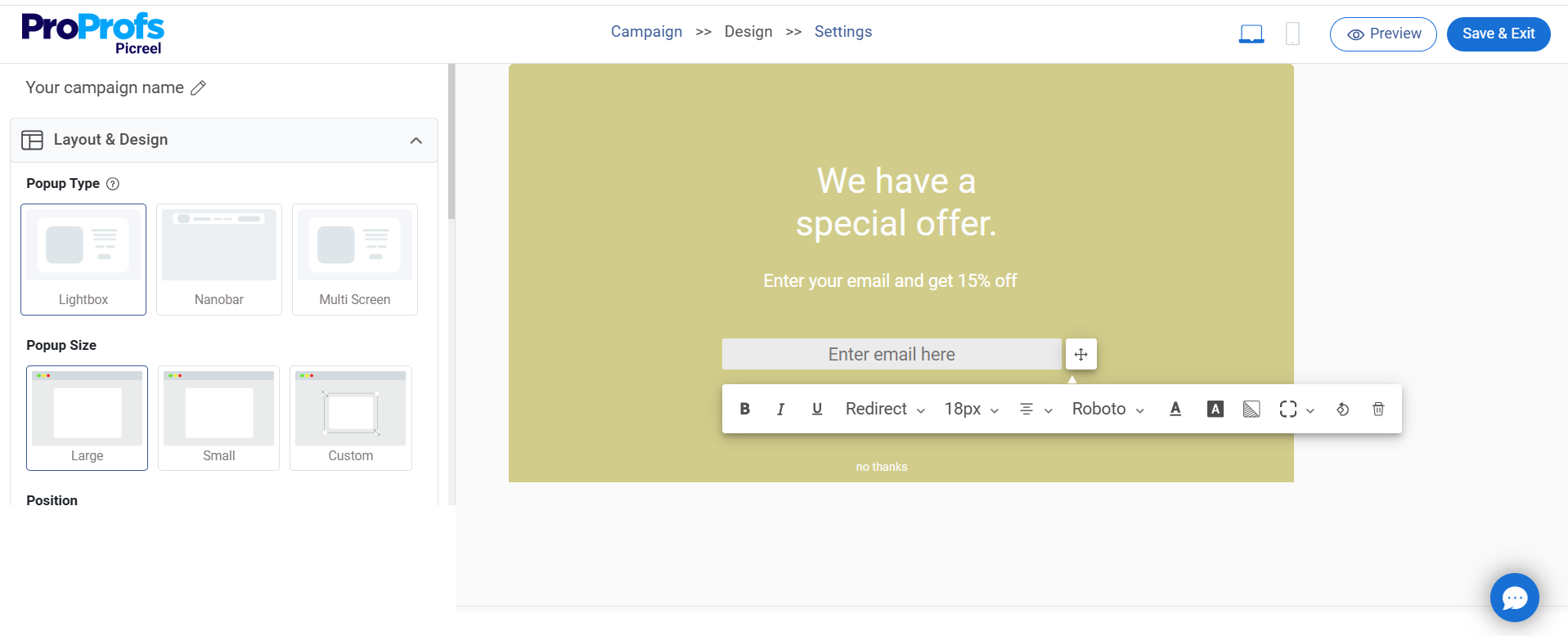
- Design: When designing your popup survey, start by choosing a background that matches your brand — solid color, image, or a subtle GIF to grab attention. Then, adjust your text and button colors to make everything clear and readable. Always keep the close button visible so users can exit easily. This small step gives visitors control, builds trust, and keeps the experience smooth.
- Fields: Keep your survey popup short and focused. Ask only what’s essential — for example, “How would you rate your experience today?” with a quick 1–5 scale. Add one or two optional fields like name or email if needed. Simple popup surveys with just 1–3 questions see an 83.34% completion rate, proving that shorter surveys get more responses.
- Options: Decide how your popup behaves. Add smooth animations (fade, slide, zoom), choose placement (center or corner), and set visibility duration.
- Fonts: Pick clean, easy-to-read fonts that match your brand style. Use short, clear labels so visitors can fill out the form quickly. Avoid decorative fonts that make text harder to read.
- Personalization: Personalize your popup survey using CRM data to make them more engaging. You can greet returning visitors by name or show location-based messages such as “Free shipping in New York today.” Add dynamic content like recently viewed products to make each popup feel relevant and timely.
Once customized, click “Save” to store your design.
Step 4: Configure Popup Settings
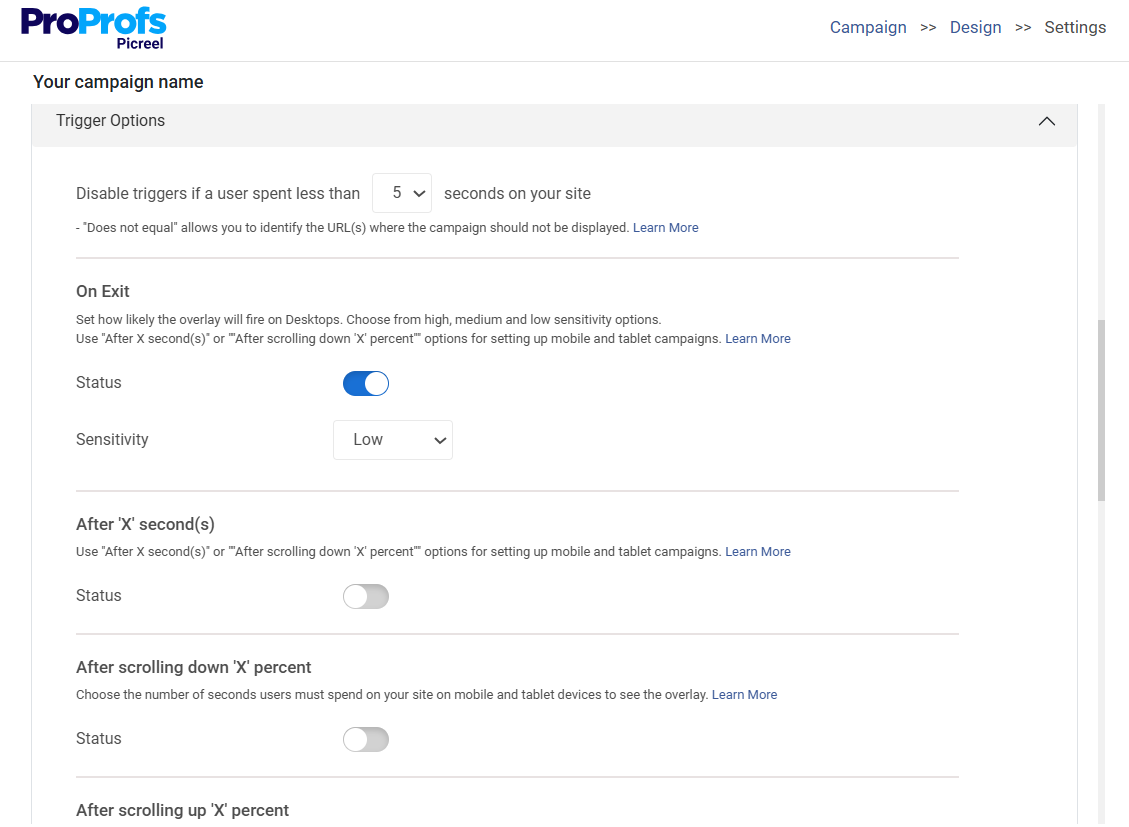
Now that your design is ready, it’s time to set when and how your popup appears. Here’s how to fine-tune the settings for the best timing and visibility.
Basic Settings: Decide where your popup should appear. You can choose whether to display it on all pages or just specific ones (like your homepage or pricing page). Targeting specific pages helps you collect focused, real-time feedback that’s easier to act on.
Popup Timing: Set when your popup appears so it feels natural, not disruptive. Choose one of these triggers:
- Exit Intent: Show the popup right as users move their cursor to leave the page.
- Time Delay: Display it after visitors spend a few seconds browsing.
- Scroll Percentage: Trigger it when users scroll a set percentage of the page, such as 50%.
- On Click: Make the popup appear when users click a specific button or link.
Impression Frequency: Avoid overwhelming visitors with repetitive popups. Set how often it appears — once per session, per day, or after a set number of interactions. This ensures your popup stays helpful rather than intrusive.
Targeting Rules: Fine-tune who sees your popup to make it more relevant:
- New vs. Returning Visitors: Show different offers or surveys based on user type.
- Geo-Targeting: Display the popup only in selected countries or regions.
- Device Targeting: Create tailored popups for desktop, mobile, or tablet visitors.
- Cookie Targeting: Personalize based on a visitor’s past actions, such as pages viewed or previous submissions.
Use these targeting settings together to make every popup feel personalized and timely.
Once your settings are set, review everything and click “Save.” Your WordPress popup survey is now live and ready to engage visitors!
Step 5: Track Performance and Optimize
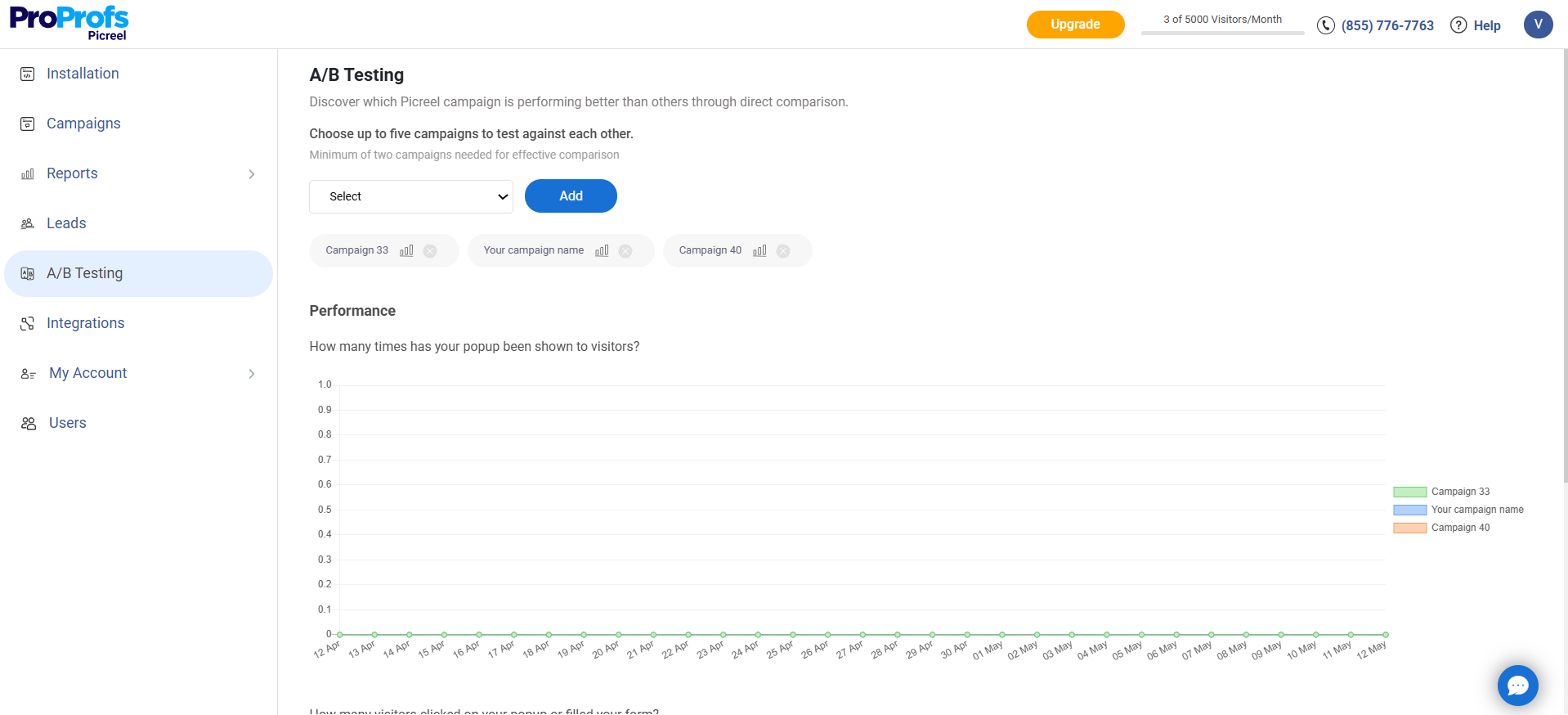
After launching, open the analytics dashboard to review performance metrics like views, clicks, and conversions.

- Identify which CTAs, triggers, and messages perform best.
- Use A/B testing to compare variations, then refine your designs and timing using real-time analytics.
Why Use Popup Surveys on Your WordPress Site
Popup surveys may look simple, but they’re surprisingly powerful. They catch visitors in the moment, ask quick questions, and uncover insights you won’t find in your analytics. If you want to boost engagement, refine key pages, and make smarter decisions, here’s why adding popup surveys to your WordPress site is worth it.
1. Capture Real-time Visitor Feedback
Popup surveys let you gather feedback at the exact moment visitors experience confusion, interest, or hesitation. Since the questions appear while they’re actively browsing, the responses reflect genuine thoughts rather than vague recollections. This helps you understand what’s working, what needs clarity, and what’s slowing people down.
Over time, these real-time insights guide smarter improvements across your pages, messaging, and overall user flow so visitors can navigate your site with more confidence.
2. Reduce Bounce and Cart Abandonment
When a visitor is about to leave your site or abandon their cart, a quick popup survey can reveal the real reason behind their hesitation. Maybe the pricing feels unclear, the product details aren’t convincing, or they simply expected something different.
Exit-intent popup surveys often help recover around 15% of visitors, which means fewer people slip away unnoticed. By understanding these friction points, you can refine the experience and reduce avoidable drop-offs.
3. Generate High-quality Leads
Popup surveys help you qualify leads by asking simple but meaningful questions about goals, needs, or challenges. You can also use them to offer a resource or discount in exchange for an email, ensuring that only genuinely interested visitors opt in. Instead of collecting generic contacts, you gather leads with clear intent and context.
This makes follow-up communication more relevant, improves nurturing, and boosts your chances of converting visitors into paying customers.
4. Personalize User Experience
Popup surveys help you understand what visitors want by asking simple, contextual questions while they’re exploring your site. Their answers give you the clarity to highlight the right products, course topics, or next steps instead of relying on assumptions.
And because nearly 80% of consumers prefer personalized experiences, using this real-time input to guide their journey feels expected rather than intrusive. With clearer direction and more relevant suggestions, visitors stay longer, explore deeper, and move through your site with greater confidence.
5. Validate New Ideas Quickly
If you’re considering launching a new feature, product, or offer, popup surveys let you test demand before making a big investment. A single targeted question can reveal whether your audience cares about the idea, what they would change, or what they expect.
This feedback helps you avoid risky assumptions and prioritize ideas with real potential. It’s a fast, low-cost way to make smarter decisions and stay aligned with what your users truly want.
Proven Checklist to Boost WordPress Popup Survey Conversions
Creating a popup is simple, but getting users to engage takes strategy. Use this quick checklist to design WordPress popup surveys that capture attention, boost responses, and turn visitors into leads.
| Best Practice | Action |
|---|---|
| Keep questions minimal | Ask only one or two focused questions. Too many can overwhelm visitors and reduce completion rates. |
| Better target visitors | Trigger popups on exit intent, scroll depth, or time on page. Well-timed surveys feel helpful, not intrusive. |
| Add a compelling incentive | Offer an eBook, discount, or exclusive resource to motivate users to participate and share their details. |
| Design for clarity and consistency | Match your popup’s look with your site’s branding. Consistent colors, fonts, and tone build trust and credibility. |
| Optimize for mobile | Ensure popups look great on all devices. A mobile-friendly design prevents frustration and increases engagement. |
| Personalize the message | Tailor questions or offers based on visitor behavior, location, or referral source to make them feel relevant. |
| Follow up effectively | Automate thank-you emails or deliver promised incentives instantly to maintain trust and boost conversions. |
| Test and refine | A/B test headlines, timing, and designs. Use analytics to identify what works and continuously improve results. |
FREE. All Features. FOREVER!
Try our Forever FREE account with all premium features!
Common Mistakes to Avoid When Using Popup Surveys
Even with the best intentions, many WordPress site owners unintentionally use popup surveys in ways that frustrate visitors instead of engaging them. Avoiding a few simple mistakes can make your surveys far more effective and user-friendly. Here’s what to watch out for:
1. Showing Popups Too Soon
Displaying a survey immediately after someone lands on your site can feel intrusive. Use timing triggers like scroll depth or exit intent to show surveys only when users are ready to engage.
2. Asking Too Many Questions
Long surveys often lead to drop-offs. Keep it short and focused on one key objective — whether it’s collecting feedback, understanding user intent, or generating leads.
3. Ignoring Mobile Experience
If your popup isn’t optimized for mobile, it can break layouts or block content. Always preview and test your surveys on different devices before publishing.
4. Using Generic Or Irrelevant Questions
Generic surveys feel impersonal. Tailor questions to the visitor’s journey or the page they’re on. Contextual questions drive better responses and higher engagement.
5. Neglecting Follow-Ups
Collecting data without acting on it wastes opportunity. Use integrations or automation to trigger thank-you messages, send incentives, or follow up with personalized emails.
Make WordPress Popup Surveys Your Growth Engine!
A popup survey plugin on a WordPress site is one of the most effective ways to capture visitor feedback, boost engagement, and turn casual traffic into qualified leads. When set up correctly, it helps you understand your audience in real time and make smarter marketing decisions.
Keep your surveys short, use smart triggers, and personalize questions based on visitor behavior for the best results. Always test and refine your popups to see what truly resonates. If you’re looking for an easy, powerful tool to create and optimize popup surveys, try Picreel. It offers smart targeting, seamless integrations, and conversion-focused templates built for results.
FREE. All Features. FOREVER!
Try our Forever FREE account with all premium features!

 We'd love your feedback!
What did you like & how can we make it even better?
 Thanks for your feedback!
 Ask Your Question
Have a question? Get expert help to make your decision easier.