
Everyone has an opinion about sales popups. Some swear by them. Others close them on instinct. In reality, most popups fail not because the idea is wrong, but because the execution is careless. Today, using sales popups isn’t about being louder or more aggressive.
It’s about timing, relevance, and restraint. I’ve seen intrusive popups drive visitors away, and simple, well-placed ones quietly lift conversions.
The difference? One interrupts. The other supports the decision already in progress. In this guide, you’ll learn how to build sales popups on WordPress that people actually respond to, not just tolerate.
Who This Guide Is For
- Business owners and CEOs looking to improve conversions from existing WordPress traffic
- eCommerce and WooCommerce teams focused on reducing cart abandonment
- SaaS and subscription businesses using WordPress for acquisition or upgrades
- Marketing and growth leaders optimizing on-site conversions without increasing ad spend
- Agencies managing sales popups across multiple WordPress sites
If you’re evaluating sales popups as a conversion tool, not a gimmick, this guide is written for you
How to Build a Sales Popup That Actually Converts
Sales popups work best when they feel purposeful, not random. The goal is to guide decisions, not interrupt browsing.The steps below will help you create a popup that does exactly that.
Step 1: Defining the Job of Your Sales Popup
Before thinking about tools, design, or triggers, get clear on one thing: what business outcome should this popup drive?
Most WordPress sales popups fail not because they look bad, but because their job was never defined. When a popup tries to collect leads, push a sale, and promote content at the same time, it usually does none of them well.
Start With One Business Goal
Treat your popup like any other growth lever. Give it one clear, measurable objective.
In most cases, WordPress sales popups fall into one of three categories:
- Lead capture: Ideal when the goal is to build a pipeline from existing traffic. Keep the ask simple, an email or signup, nothing more.
- Direct sales: Best used when visitors are already close to purchasing. The popup should ease hesitation or add urgency, not introduce new information.
- Redirection: Useful when you want to shift attention to a specific landing page, offer, or announcement without collecting personal data.
Pick one. If the goal isn’t obvious to you, it won’t be obvious to your visitor.
Match the Popup to Visitor Intent
The quickest way to hurt conversions is to ignore context.
Ask one question before launching: What is the visitor trying to do on this page right now?
Someone reading a long article is exploring. Someone about to leave a checkout page is deciding. Your popup should support that moment, not interrupt it.
One Popup, One Outcome
Clarity beats creativity. A strong sales popup:
- Asks for one action
- Solves one problem
- Moves the visitor one step forward
If a popup needs multiple CTAs or explanations, it’s trying to do too much.
Rule of thumb: If you can’t explain what your popup is meant to achieve in one sentence, pause. Tighten the goal first. Everything else becomes easier after that.
Step 2: Choosing How You Want to Create Your Sales Popup (AI vs Templates)
Once you’re clear on the job your popup needs to do, the next decision is how you want to create it. Not which tool yet, but the creation approach.
At a high level, there are two reliable ways to build sales popups today: using AI for speed and iteration, or using ready-made templates for control and consistency. Both work well when used in the right context.
Option A: Creating a Sales Popup With AI
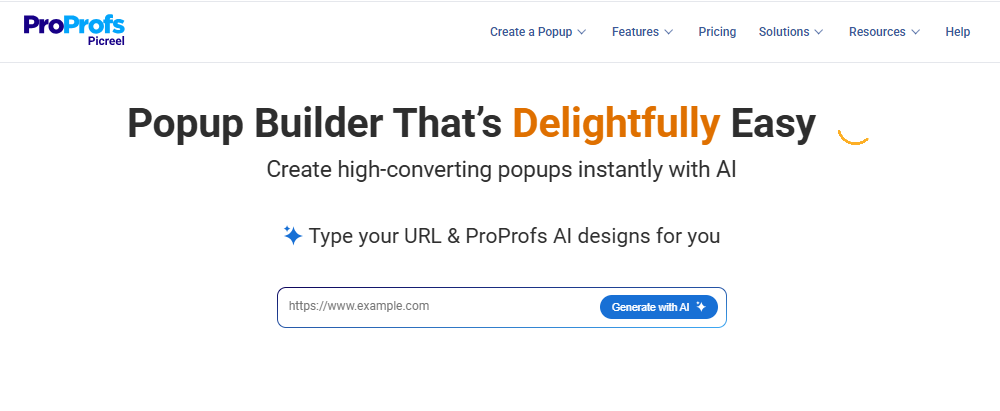
AI works best when speed matters or when you’re still figuring out what will convert.
With tools like Picreel AI, the setup is straightforward. You enter your website URL, select a goal such as lead capture, redirect, announcement, or engagement, and answer a few short prompts. The AI then generates a floating popup layout, copy, and CTA aligned with that goal.
This approach is especially useful for:
- Testing ideas quickly without starting from scratch
- Copy suggestions and layout direction fast
- Iterating and refining based on performance
The real value of AI here isn’t design polish. It’s messaging. AI helps you get to a clear, goal-aligned message faster, which you can then refine instead of writing everything from zero.
Option B: Using Ready-Made Popup Templates
Templates are the better choice when you already know what you want and need consistency.
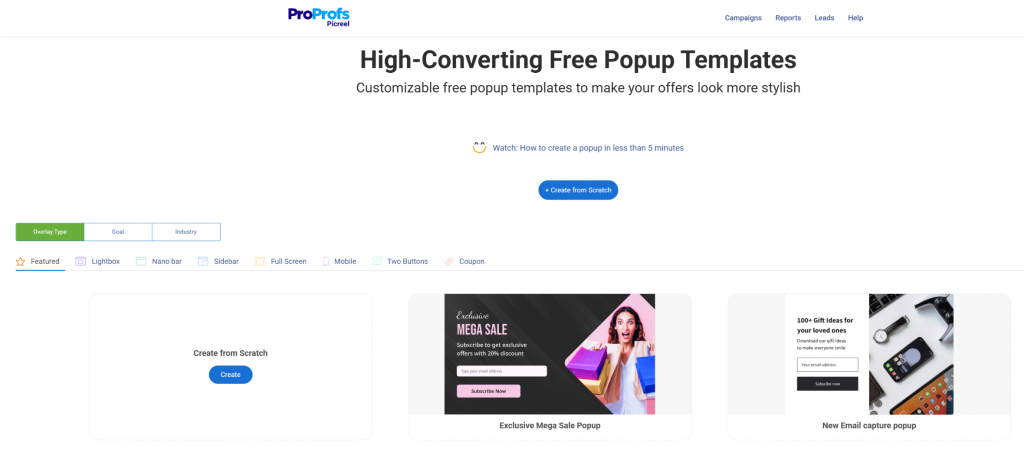
Picreel’s ready-made popup templates are designed specifically for sales and conversion use cases.
You can choose from lightboxes, slide-ins, nanobars, side popups, full-screen overlays, mobile popups, and two-button layouts, all built to stay visible without blocking content.
Templates are especially useful when you want a simple sales popup that highlights offers or activity without custom design work. The structure is already optimized, so you focus on messaging, targeting, and timing instead of design decisions.
Step 3: Setting Up the Core Popup Structure
Once you’ve chosen how to create your popup, the next step is defining its structure. This is where many sales popups lose effectiveness, not because of the offer, but because the message is hard to scan or understand quickly.
A sales popup should communicate its value almost instantly.
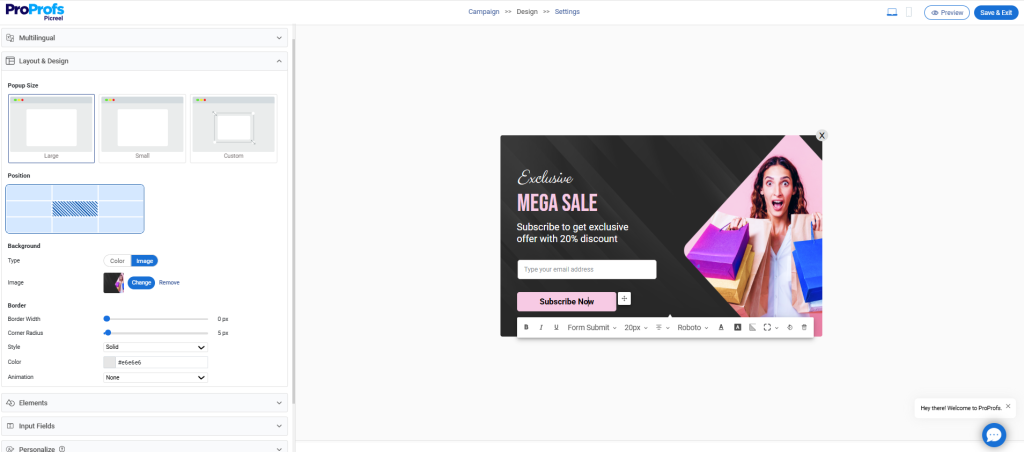
The Five Elements Every Sales Popup Needs
At its core, an effective popup has just four parts:
- Headline: This should state the value clearly and immediately. Avoid clever phrasing. Be direct.
- Supporting message: Use one short line to add context or explain why the offer matters right now.
- Choose Visuals Carefully: Use visuals only if they support the message. Skip anything that distracts or slows attention, especially on mobile.
- Call to action (CTA): One primary action only. The button text should reflect exactly what happens next.
- Dismiss option: Make it easy to close. A visible exit builds trust and reduces frustration.
Step 4: Choosing When the Popup Appears (Triggers and Timing)
Next, decide when your sales popup should appear. This decision has more impact on conversions than design or copy.
Common and effective trigger options include:
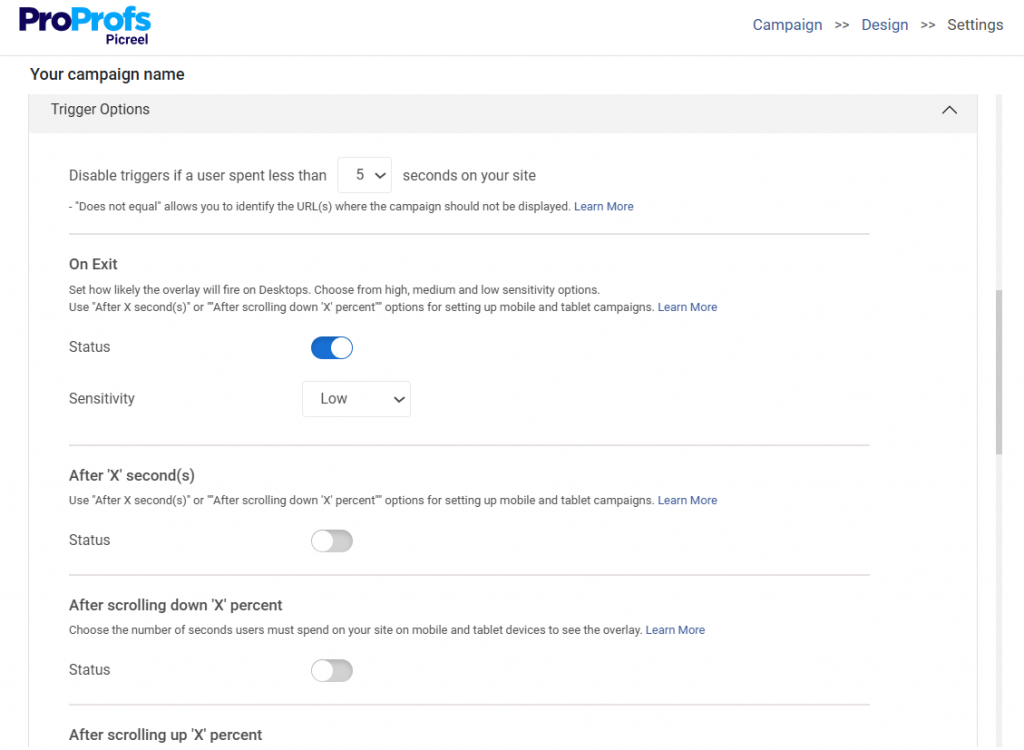
- Exit intent: Show the popup when a visitor is about to leave. This works especially well for cart abandonment and last-minute offers.
- Scroll-based triggers: Display the popup after a visitor scrolls around 50% of the page. This ensures they’ve engaged before being interrupted.
- Time-on-page triggers: Trigger the popup after a short delay, such as 5–10 seconds. This gives visitors time to absorb value first.
- Click-triggered popups: Show the popup only when a user clicks a button or link. This keeps the experience fully opt-in.
To keep things user-friendly, avoid showing popups immediately on page load and avoid triggering them everywhere. Timing should feel natural, not aggressive.
Step 5: Deciding Who Sees the Popup (Targeting Rules)
Once timing is set, decide who should see the popup. Not every visitor needs to see every message, so popup targeting is non-negotiable here.
Common targeting rules include:
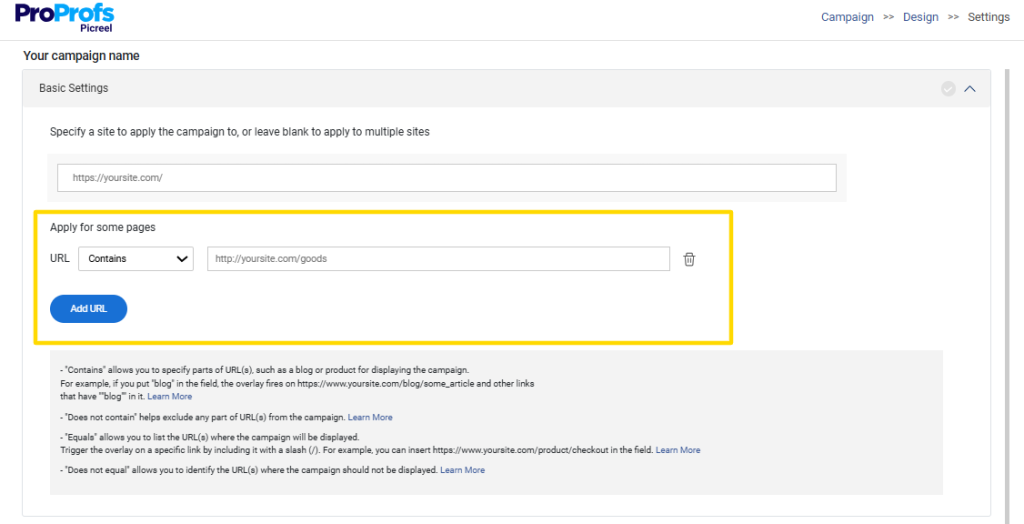
- Page-level targeting: Limit popups to relevant pages instead of site-wide exposure.
- URL and UTM-based rules: Customize popups based on traffic source, campaign, or intent.
- Location-based targeting: Adjust messaging based on geography when relevant.
- New vs returning visitors: Show different messages based on familiarity with your site.
- Frequency capping: Control how often the same popup appears to avoid fatigue.
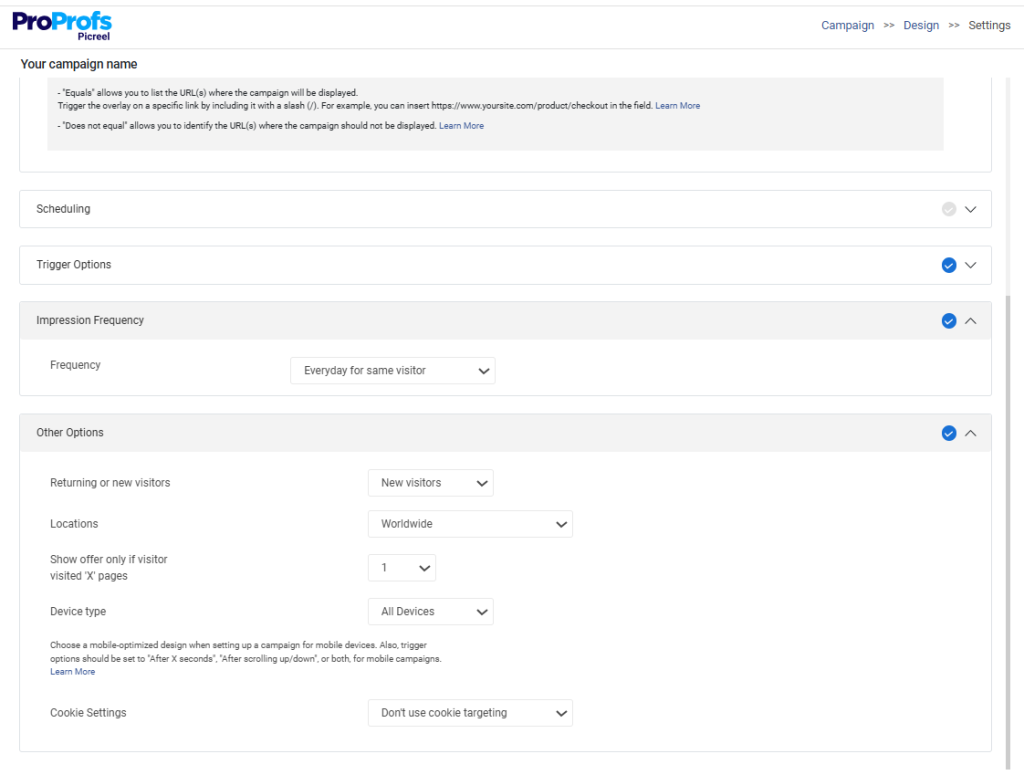
Targeting ensures your popup feels intentional and relevant instead of repetitive.
When timing and targeting work together, sales popups stop feeling disruptive and start supporting decisions at the right moment.
Step 6: Tracking Performance With Analytics and Reports
Once your sales popup is live, the real work begins. What matters now is whether it’s actually helping conversions, not just showing up on the site.
This step is about using data to decide what to keep, improve, or remove.
Key Metrics to Track
Focus on a small set of signals that reflect real business impact:
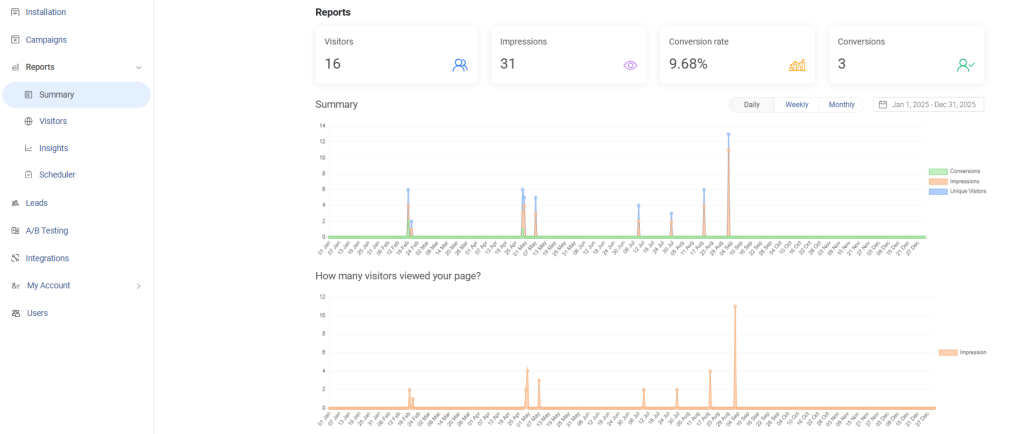
- Conversion rate: Measure how many visitors take the intended action after seeing the popup.
- Assisted conversions: Track whether the popup supports later purchases or signups, even if it’s not the final click.
- Bounce rate impact: Watch for spikes after the popup appears. A rising bounce rate is often a timing or targeting issue.
Test Before You Scale
Use A/B testing to compare:
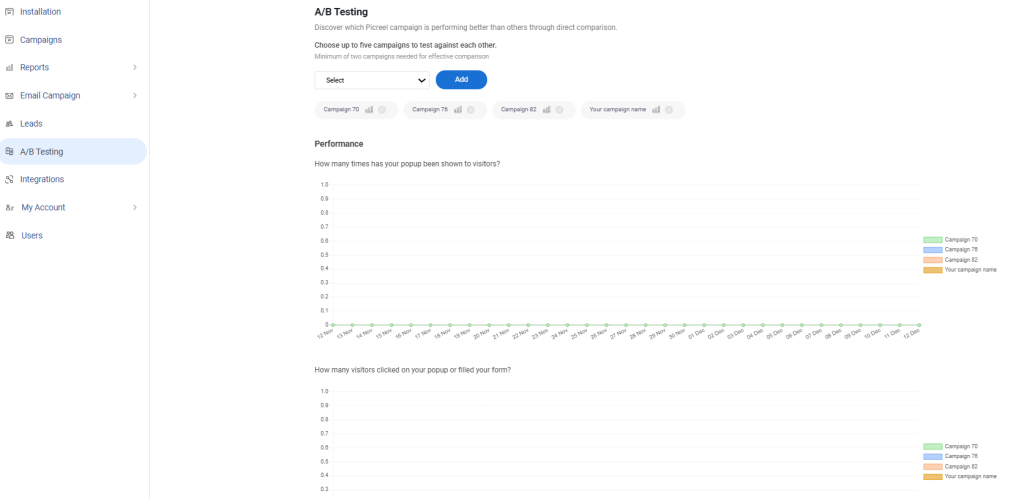
- Different messages
- Trigger timings
- CTAs or offers
Small changes often have a bigger impact than redesigns.
How to Improve Mobile Popup Performance With Simple UX Fixes
If sales popups underperform, mobile is usually the reason.
Most WordPress traffic today comes from mobile, where screens are smaller, and patience is shorter. A popup that feels acceptable on desktop can quickly push mobile users away.
This is why higher mobile bounce rates are often misinterpreted. It’s not always traffic or speed. Poorly optimized popups interrupt scrolling, reading, or buying, and people simply leave.
That’s when I’ve seen teams asking why mobile bounce rates are higher or whether popups hurt SEO. In most cases, the fix isn’t removing popups. It’s about designing them for mobile behavior, rather than shrinking desktop versions.
When mobile is treated as the primary experience, popups stop feeling intrusive and start supporting decisions.
Here’s how you can do it:
1. Mobile-First Popup Sizing
On mobile, space is limited. Full-screen popups or oversized modals usually do more harm than good.
So, I suggest setting popups for both desktop and mobile so they are responsive on all devices:
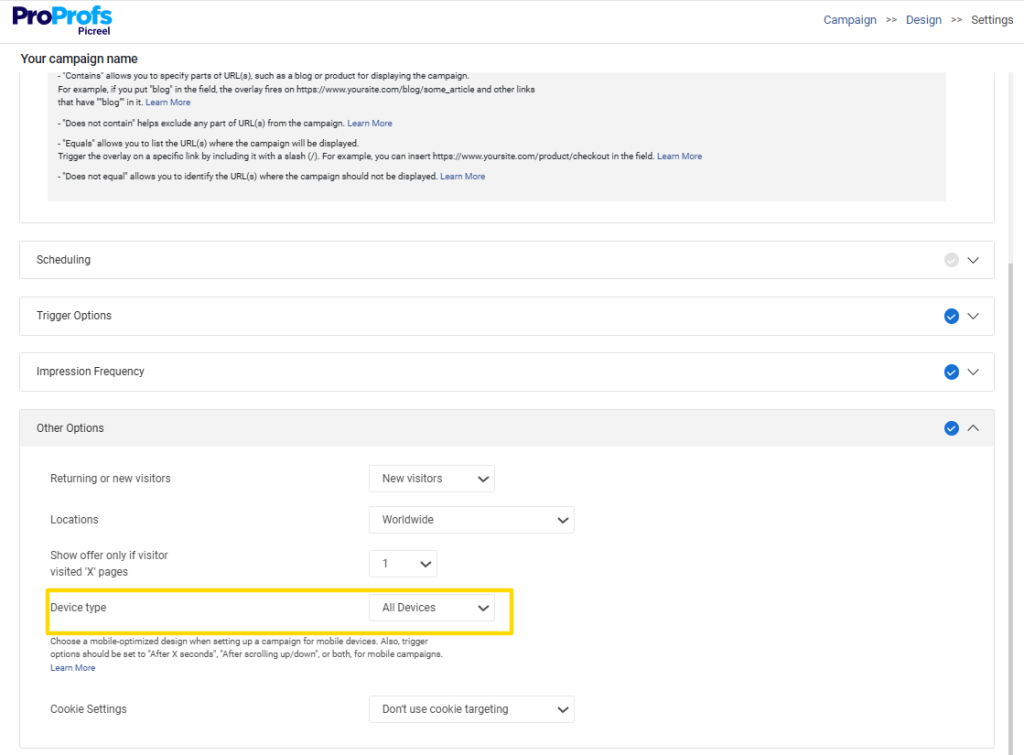
Well-performing mobile popups:
- Take up only the space they need
- Avoid covering the entire screen
- Feel like part of the page, not a roadblock
If someone has to work to see the content underneath, the popup is already too big.
2. Easy, One-Tap Dismissal
Closing a mobile popup should be effortless.
A clear close icon, visible text option, or swipe action matters more than you think. If users struggle to dismiss a popup, frustration builds fast, and exits follow.
A simple rule works well here: if it takes more than one tap to close, it’s too much.
3. Scroll-Safe Placement
Popups that interrupt scrolling feel especially aggressive on mobile.
Instead of breaking the flow:
- Let users scroll first
- Trigger popups after engagement, not on load
- Avoid placing popups directly over key buttons or content
Slide-ins, banners, or bottom-aligned popups often perform better than centered modals on small screens.
4. Google UX and Interstitial Guidelines
There’s also a search visibility angle to consider.
Google discourages intrusive interstitials on mobile, especially those that block content immediately after page load. While not every popup is penalized, aggressive implementations can impact both user experience and rankings.
This is why timing and placement matter as much as the message itself.
When Sales Popups Make Sense and What They’re Used For
Before adding a sales popup to your WordPress site, it’s worth stepping back and asking one question: Is a popup actually the right tool for what I’m trying to achieve?
Sales popups are powerful, but only in the right context. Used thoughtfully, they help you make better use of traffic you already have. Used carelessly, they hurt trust and quietly push people away. This section is about drawing that line early.
Getting clear on when and why to use a sales popup helps you:
- Decide if a popup belongs on your site at all
- Avoid adding friction to otherwise smooth customer journeys
For leadership teams, this isn’t about chasing tactics. It’s about protecting brand experience while improving conversion efficiency.
When Sales Popups Work Well
Sales popups tend to work best when visitors already show some level of intent and the popup supports a natural next step.
They’re especially effective in situations like these:
- High-traffic content pages with clear intent: When people are actively reading guides, blogs, or resources, a relevant popup can surface an offer they might otherwise miss.
- Cart abandonment and exit-intent scenarios: A well-timed reminder or incentive right before someone leaves can recover revenue without interrupting the buying flow.
- First-time visitor offers with obvious value: Discounts, trials, or useful resources can work well when they’re framed as a benefit, not a demand.
- SaaS feature announcements or plan upgrades: Popups can quietly highlight new features or upgrades when users are already exploring product-related pages.
- Time-sensitive campaigns or launches: Limited-time promotions, seasonal offers, or announcements often benefit from controlled visibility.
In these cases, the popup feels helpful. It adds context rather than noise.
When Sales Popups Hurt Conversions
Just as important is knowing when not to use them.
Sales popups often backfire when they appear without context or respect for user behavior.
Common problem areas include:
- Instant-load popups before any engagement: Interrupting someone before they’ve seen value is one of the fastest ways to increase bounce rates.
- Generic offers shown to all visitors: Treating every visitor the same ignores intent and makes the popup feel irrelevant.
- Repeating the same popup for returning users: What felt useful the first time quickly becomes annoying the second or third.
- Blocking key actions like “Add to Cart” or navigation: A popup should support decisions, not get in the way of them.
This is usually where teams start asking why conversions dropped after “adding a simple popup.”
What Businesses Actually Use Sales Popups For
In practice, most companies use sales popups for a small set of focused goals. When the goal is clear, popups are easier to design and easier to control.
The most common use cases include:
- Increasing leads from existing organic traffic: Turning readers and visitors into prospects without increasing ad spend.
- Reducing cart abandonment: Recovering high-intent visitors who were close to converting.
- Creating urgency using real social proof: Many teams use a recent sales popup WordPress setup to show real activity on the site, which helps build trust and reduce hesitation without pushing a hard sell.
- Redirecting visitors to priority pages or offers: Sometimes the goal isn’t data capture, it’s simply directing attention.
- Managing popups across multiple WordPress sites: Especially relevant for companies, franchises, or agencies running several properties.
How These Goals Apply Across Different Business Models
Sales popups aren’t limited to online stores. They show up across many WordPress-driven businesses:
- E-Commerce stores adopt a live sales popup WordPress approach to quietly reinforce demand by showing real-time purchases while shoppers browse product pages.
- SaaS and subscription businesses use them for upgrades, trials, or feature announcements
- Coaches and course creators use them to drive enrollments or consultations
- Content-heavy blogs and publishers use them to surface key resources
- Agencies use them to standardize conversion tactics across client sites
The key takeaway is this: sales popups work when they respect intent, timing, and context. They fail when they’re used as a blunt instrument.
Getting this step right makes every decision that follows, tools, templates, and triggers, far more effective.
Turning Sales Popups Into a Reliable Growth Lever
Sales popups aren’t about forcing attention. They’re about using timing, intent, and clarity to support decisions that visitors are already close to making. When the goal is clear, the structure is simple, and targeting is thoughtful, popups stop feeling intrusive and start delivering real results.
The teams that see consistent gains don’t use more popups. They use fewer, better ones. They test, refine, and remove what doesn’t work. And they design for mobile first, knowing that’s where most decisions now happen.
If you’re looking to put these ideas into practice without heavy setup or development, tools like Picreel make it easy to build, test, and optimize sales popups using AI or proven templates.
Start small. Measure what matters. And let your popups earn their place on your site. Try Picreel for free and turn existing traffic into measurable growth.
Frequently Asked Questions

Should I show this popup to all visitors or only some?
Only show popups to visitors who are likely to benefit from them. Targeting by page, behavior, or visit type almost always performs better than showing the same popup to everyone.
Can one popup tool work across multiple sites?
Yes. Many popup tools like Picreel support multiple websites, which is especially useful for businesses, franchises, or agencies managing several WordPress properties.
Can popups redirect users without collecting emails?
Yes. Popups can simply guide visitors to a landing page, offer, or announcement without asking for any personal information.
FREE. All Features. FOREVER!
Try our Forever FREE account with all premium features!

 We'd love your feedback!
What did you like & how can we make it even better?
 Thanks for your feedback!
 Ask Your Question
Have a question? Get expert help to make your decision easier.